

6 reasons agencies switch from InfiniteWP to WP Umbrella


Delivery model
(Competitor) Self-hosted admin panel you install and maintain on your own server, with separate provisioning, PHP upgrades, SSL renewal, and panel backups.
(WP Umbrella) Hosted SaaS. We run the control plane, ship security patches, and handle the infrastructure underneath so you log in and operate sites.
Pricing model
(Competitor) Tiered plans plus 24 a-la-carte add-ons (Backup, Uptime Monitoring, Client Reporting, Branding, etc.), with two pricing structures live in parallel.
(WP Umbrella) Flat €1.99/site/month with every core feature included. Two optional add-ons (Security, Hourly Backups), both clearly priced.
Security stack
(Competitor) Integration-shaped: Wordfence, Sucuri, Solid Security and Google Safe Browsing as paid add-ons, each with its own license and update channel. No first-party firewall or virtual patching.
(WP Umbrella) First-party Patchstack-powered vulnerability database scanning every site every 6 hours. Optional Security add-on (2€/site/month) adds a firewall with virtual patching, a network-learned malicious-IP blocklist, attack detections, and daily malware scanning.
Safe updates
(Competitor) Bulk and scheduled updates included. Visual regression testing and automatic rollback on failure are not documented.
(WP Umbrella) Visual regression screenshots before and after every update, with automatic rollback if a check fails. Pre-update backup created every time.
Monitoring
(Competitor) Uptime Monitoring is a paid add-on. Probe locations are not documented. PHP error monitoring isn't offered. Alerts are email-only.
(WP Umbrella) Uptime checks at 1–60 minute intervals from 5 global locations (EU, US East, US West, Asia, Australia). Core Web Vitals (LCP, CLS, INP), SSL and domain expiry, real-time PHP errors. Email + Slack alerts.
Data jurisdiction
(Competitor) Self-hosted means your server's jurisdiction governs site data and you carry the operator-level risk.
(WP Umbrella) France-based vendor under EU/GDPR processing. Encrypted backups stored on our own EU servers. A GDPR Data Processing Agreement is available.
No credit card required. Quick setup. Cancel any time.
Our team connects to your sites, sets up the WP Umbrella dashboard, mirrors your update schedules and reporting cadence, and verifies backups before we hand the keys back. Most migrations complete in 24 to 72 hours depending on portfolio size.


Most InfiniteWP users we talk to didn't pick a self-hosted admin panel because they wanted to be sysadmins. They picked it because, in 2016 or 2019, the math worked: a few sites, a small server, a stack of add-ons. The shape that made sense then has quietly grown a second job description on top of the first one.
That second job is the cost most people don't price in: keeping the admin panel itself patched, hardened, and online. Server provisioning. PHP upgrades. SSL renewal on the panel domain. Backups of the panel database, separate from client site backups. On WP Umbrella, that schedule disappears: the control plane is ours to run.


Bulk plugin, theme, and core updates
Pre-update backup creation
1-click admin access into client sites
Visual regression testing on updates
Automatic rollback on failed update
Changelog and license expiry monitoring
No server, panel, or PHP version to patch yourself


WordPress security in 2026 is not the same problem it was in 2022. Supply-chain attacks now ship through legitimate plugin update channels, and management-plane vulnerabilities have moved from edge case to disclosed CVE. The admin panel that watches your client sites is itself part of the attack surface.
WP Umbrella runs a first-party vulnerability database powered by Patchstack, scanning every managed site every six hours. CVEs are tracked, severity-ranked, and surfaced before they become incidents. The optional Security add-on (2€/site/month) adds a firewall with virtual patching (powered by Patchstack), so known exploits are blocked before the fixing update, plus a malicious-IP blocklist learned across the network, attack detections across eight checks, and a daily malware scanner.
First-party vulnerability database
Patchstack-powered scanning every 6 hours
CVE tracking with severity ranking
Firewall and virtual patching (Security add-on)
Daily malware scanning (Security add-on)
Malicious-IP blocking at login (Security add-on)
Attack detections with a Security-Driven Activity Log (Security add-on)
PHP error monitoring
GDPR-compliant storage on our own EU servers
Single security vendor for control plane + detection
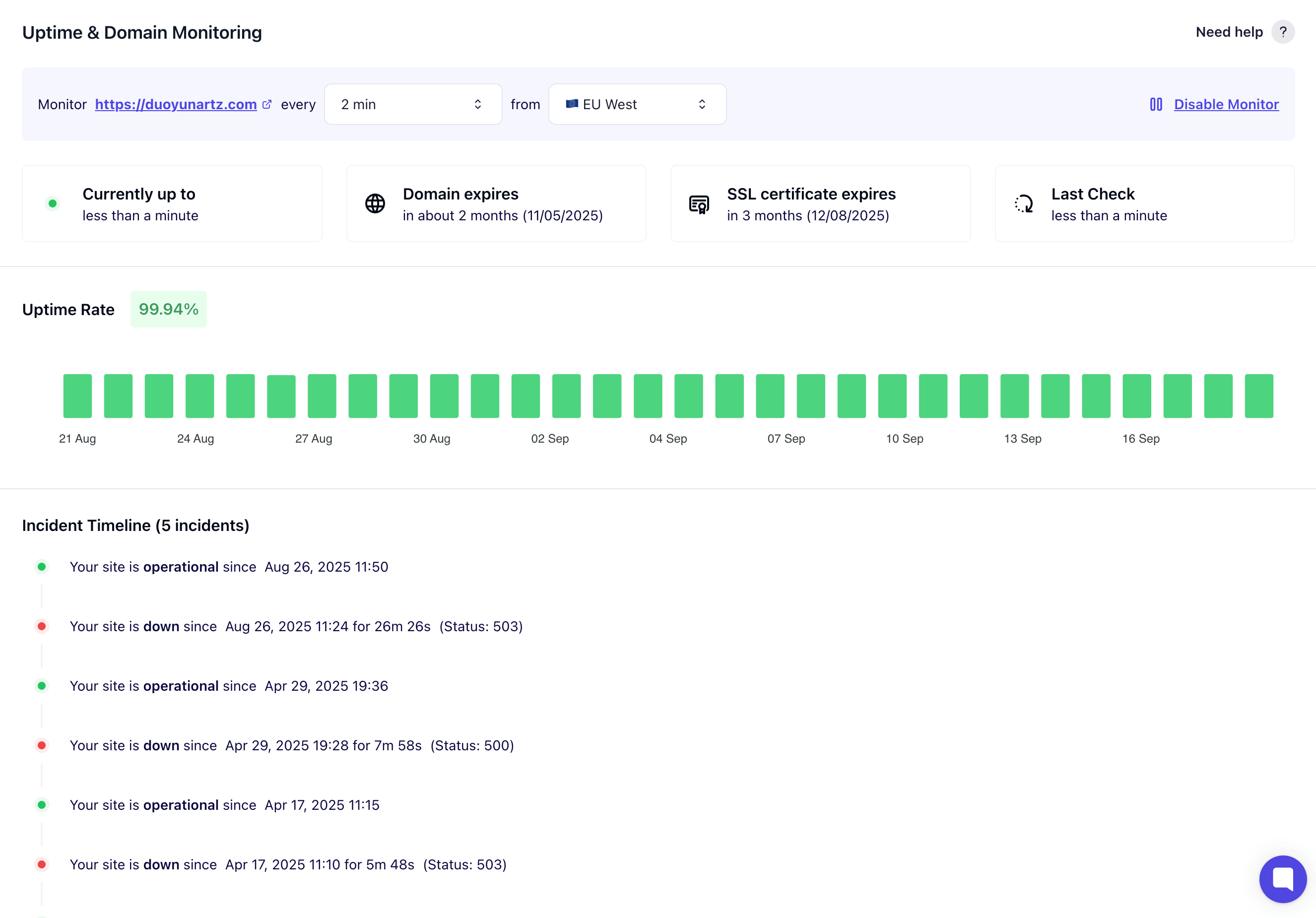

Uptime monitoring is the feature everyone advertises and most platforms half-implement. The honest measure is whether the alerts you receive at 2am tell you something you can act on, or whether they just tell you something is wrong somewhere.
WP Umbrella runs uptime checks at 1–60 minute intervals from 5 global locations (EU, US East, US West, Asia, Australia). A site flagged down from one location but up from four others is a routing or regional incident, and the dashboard tells you which. Core Web Vitals (LCP, CLS, INP) are tracked continuously, SSL and domain expiry are tracked per site, and PHP errors surface in real time. Alerts route to email and Slack.
Uptime monitoring
5 global probe locations (1–60 min intervals)
Core Web Vitals tracking (LCP, CLS, INP)
SSL certificate and domain expiry monitoring
Real-time PHP error monitoring
Slack integration for alerts
PageSpeed checks included (no add-on required)

Care plans only work if the client can see what they're paying for. The report is the artifact that proves the recurring fee is earning its keep. Everything else (updates, backups, monitoring) happens whether the client knows about it or not. The report is what they read.
WP Umbrella includes white-label PDF and email reports in the per-site price. 50+ variables are available (updates performed, backups completed, uptime percentages, security scans, custom work entries), and reports carry your agency branding (name, logo, colors), can be served from a custom domain, and run on recurring schedules. InfiniteWP's Client Reporting is a paid add-on; Branding is a separate add-on on top.
Automated scheduled reports
White-label PDF + email delivery (included)
Agency branding included (no extra add-on)
50+ customizable variables
Custom domain for report delivery
Custom work entries on every report
Public API + webhooks

"When we started WP Umbrella in 2021, the question wasn't 'is self-hosted bad and SaaS good'. It was about what shape of business an independent operator actually wants to run. As the WordPress threat surface keeps expanding, that question gets sharper. Running your own admin panel means you're operating security infrastructure for every client whose credentials live in it. We built a managed platform with a first-party vulnerability stack so that's our problem, not yours."
Aurelio Volle
CEO & Co-founder, WP Umbrella

4,9
5,0
4,8
I have worked with many other solutions like MainWP, InfiniteWP, WP Remote, iThemes Sync... I chose WP Umbrella because it is fast, has a great price, a clean and beautiful interface and a promising roadmap.

Arne Brockmann
·Freelancer
Switched from InfiniteWP to WP Umbrella
Pricing
Tiered plans + 24 a-la-carte add-ons. Agency plan at 100 sites, about $0.37/site, panel only
Monthly flat fee, every core feature included
 Safe updates with visual regression
Automatic rollback on failed updates
Patchstack-powered vulnerability scanning every 6 hours
Multi-location uptime monitoring (5 probes)
Core Web Vitals (LCP, CLS, INP)
Real-time PHP error monitoring
White-label PDF + email reports (50+ variables)
Agency branding and custom domain
Encrypted, GDPR-compliant EU backups (50-day retention)
Unlimited team members, public API + webhooks
No server, no panel patching, no third-party licenses to renew
Safe updates with visual regression
Automatic rollback on failed updates
Patchstack-powered vulnerability scanning every 6 hours
Multi-location uptime monitoring (5 probes)
Core Web Vitals (LCP, CLS, INP)
Real-time PHP error monitoring
White-label PDF + email reports (50+ variables)
Agency branding and custom domain
Encrypted, GDPR-compliant EU backups (50-day retention)
Unlimited team members, public API + webhooks
No server, no panel patching, no third-party licenses to renew Our team is available from 9am – 8pm CET Monday to Friday.
How-to guides and tutorials to get the most from your WP Umbrella account.

Automate your workflow and easily prove the value of your work to your clients.
Based on registered accounts on app.wp-umbrella.com, 2026.
Start free trial