
Bulk Security Management Dashboard: Manage WordPress Security at Scale


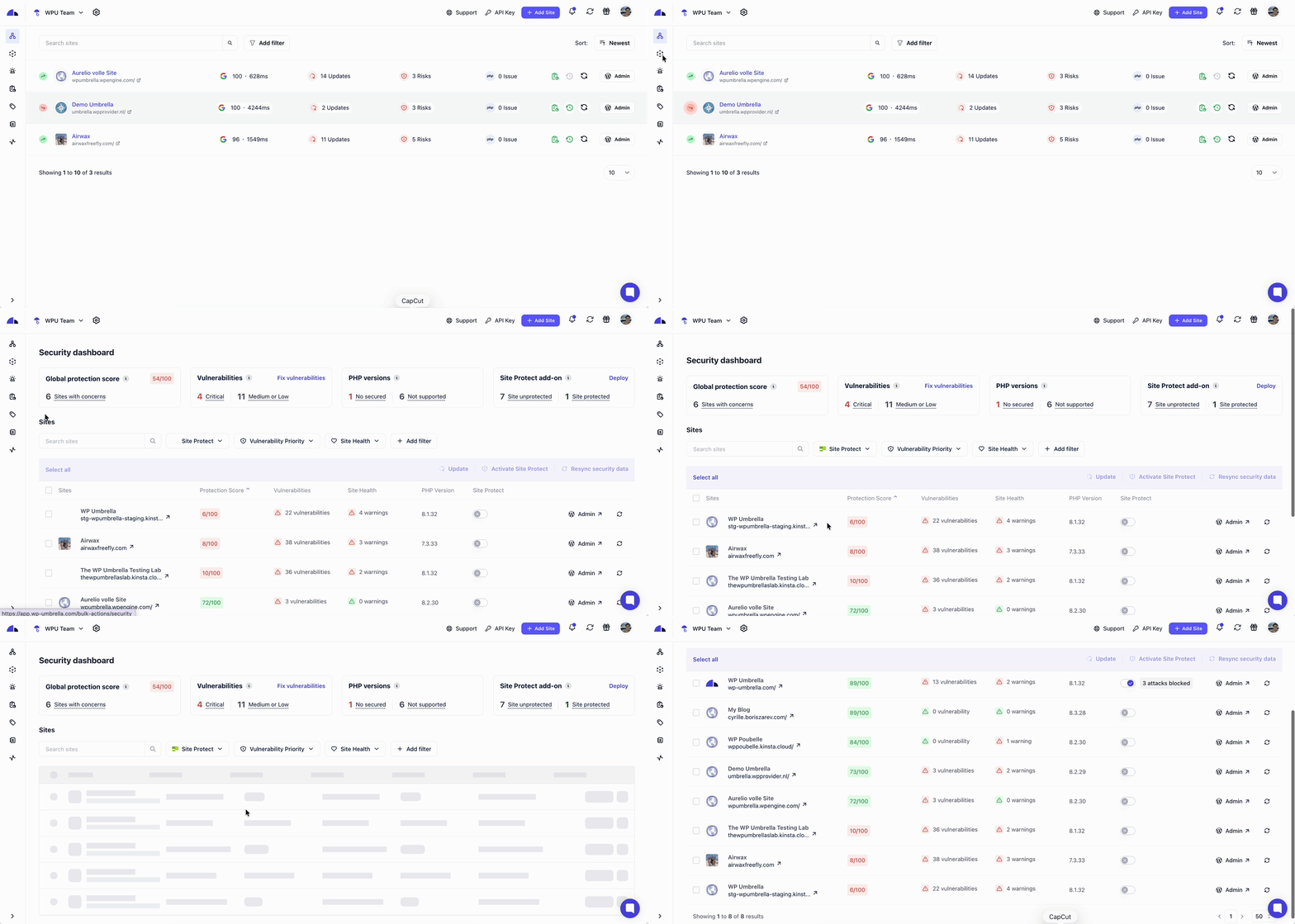
WP Umbrella’s bulk security management dashboard gives agencies a single view of vulnerabilities, PHP versions, Site Protect Status, and protection score across all their client WordPress sites. It replaces manual, site-by-site checks and makes it easier to maintain consistent security standards as agencies onboard new client websites.
Introducing our new bulk security management dashboard. It consolidates security-related signals, including PHP versions and known vulnerabilities, in one place so you can see the state of your client sites and act on risks before they become client-visible problems.
Why is security dashboard critical in agency workflows?
Once an agency manages more than a small number of sites, WordPress security monitoring stops being task-based and becomes coordination-based.
The issue is no longer whether teams know how to check and update PHP versions or review vulnerability reports. The question is whether those updates are consistent across all sites, especially the ones added recently or touched less often.
In practice, attention tends to cluster around active projects. Sites under development or recently updated are reviewed more closely, while stable sites receive less scrutiny. Over time, this creates uneven security coverage, even when intentions are good.
This results in uncertainty. Teams cannot easily answer whether all sites meet the same baseline without re-running manual checks. Responsibility exists, but visibility does not.
WP Umbrella‘s bulk security management dashboard addresses this specific breakdown. It provides a way to confirm at any time whether security standards are applied consistently across the entire portfolio, not just the sites that happen to be in focus.
Also read: 30+ WordPress Security Best Practices
What the bulk security management dashboard shows
The bulk security management dashboard surfaces a defined set of WordPress security monitoring signals that are relevant when managing sites at scale. Each is based on observable data and is meant to support prioritization.
1. Known vulnerabilities

Known vulnerabilities are publicly documented security issues affecting WordPress plugins, themes, or WordPress core. Each vulnerability is classified by severity, which reflects how easily it can be exploited and the potential impact if exploitation occurs. This allows agencies to distinguish between issues that require immediate attention and those that can be scheduled.
The dashboard aggregates these vulnerabilities across all sites, so exposure can be assessed at the portfolio level rather than site by site.
2. PHP versions
The PHP versions section shows which sites are running the PHP version currently recommended by WordPress, as well as how many sites are not aligned with that recommendation.
This view is particularly relevant in environments where hosting configurations vary or PHP upgrades are handled inconsistently. Instead of relying on periodic audits, agencies can see immediately whether PHP version alignment is being maintained across their sites.
3. Site Protect coverage
Site Protect is WP Umbrella’s security add-on designed to prevent the exploitation of known vulnerabilities through virtual patching. It replaces the need for multiple security plugins with a single, lightweight, automated solution powered by Patchstack. The dashboard shows how many sites have Site Protect enabled and how many remain unprotected, making coverage gaps visible at a glance.
4. Global protection score
The global protection score estimates how exposed your sites are to known security risks. It does not indicate whether a site has been hacked.
The score is based primarily on the presence and severity of known vulnerabilities. It also takes into account PHP and WordPress versions, site configuration issues, and whether Site Protect (virtual patching) is enabled. The purpose is to provide a high-level indication of overall exposure, helping agencies track whether their security posture is improving or degrading over time.
Filtering and bulk actions in WP Umbrella’s security dashboard
Below the global overview, the dashboard shifts from visibility to action.

Filters for focused review
Filters allow teams to narrow the list of sites based on criteria such as Site Protect status, vulnerability priority, or site health signals. This makes it possible to focus on a specific class of issues without scanning all client websites.
Filtering is especially useful during routine reviews or when responding to a specific type of risk.
Bulk actions
Once sites are selected, bulk actions allow teams to act on multiple sites at once. From this screen, you can activate Site Protect, trigger updates, or resynchronize security data without moving site by site. These actions reduce repetitive work while maintaining control in the agency’s hands.
💡
Ready to simplify WordPress security management?
See all your sites’ vulnerabilities, PHP versions, and protection status in one dashboard. Add 10 new clients without adding 10x the security work.
How the bulk security dashboard changes day-to-day security management
1. Earlier detection without manual audits
By aggregating known vulnerabilities, PHP versions, configuration issues, and Site Protect coverage into one view, the dashboard reduces reliance on periodic manual checks.
Instead of discovering issues during unrelated work or after a client raises a concern, agencies can review exposure proactively. This makes it easier to address problems while they are still routine maintenance tasks, rather than urgent incidents.
The benefit here is timing. Issues surface earlier, when they are easier to explain and simpler to fix.
2. Clear prioritization
When security data is reviewed site by site, prioritization often depends on memory or intuition. Some sites receive more attention simply because they were touched recently.
The security dashboard makes prioritization explicit. Severity levels for vulnerabilities and indicators of missing protection allow teams to decide what’s important based on risk. This helps ensure attention is evenly distributed across all websites, rather than concentrated on a small subset.
3. Less operational noise
The security dashboard consolidates important signals and reduces background noise. Teams no longer need to interpret alerts scattered across emails or Slack to understand overall exposure. They can review the state of their sites in one place and decide on actions. This supports calmer workflows, especially for agencies managing large numbers of sites.
4. Consistent security standards
As agencies add new clients or migrate sites, maintaining consistent security baselines becomes harder. The bulk security management dashboard makes gaps, such as outdated PHP on a legacy setup or vulnerabilities left unresolved, visible. It allows agencies to verify whether security standards are being applied consistently across all sites.
Conclusion
The bulk security management dashboard is meant to support consistency. It gives agencies a way to review known vulnerabilities, PHP alignment, protection coverage, and overall exposure across all sites from a single place, without relying on manual audits or assumptions.
For teams managing WordPress sites at scale, that visibility makes routine security work easier to maintain as portfolios grow.
Up next, read a complete guide to selling site protection to clients.
FAQs about the bulk security management dashboard
The bulk security management dashboard in WP Umbrella refers to monitoring and managing security signals, such as vulnerabilities, PHP versions, Site Protect status, and protection coverage, across multiple WordPress sites from a single interface instead of handling each site individually. It is popularly used by agencies and freelancers managing many client sites.
Agencies typically manage WordPress security at scale using WP Umbrella’s bulk security management feature. It’s a dashboard centralizing visibility into known vulnerabilities, PHP versions, global protection score and Site Protect status.
Without centralized dashboards, security management often relies on manual audits, individual site checks, or fragmented alerts from plugins and hosting providers.
Agencies can track PHP versions across multiple WordPress sites by using WP Umbrella’s Bulk security management dashboard, which surfaces PHP version data for all connected sites in one place. This avoids the need to log into individual hosting dashboards or perform periodic manual audits.
Site Protect is an advanced, paid security add-on powered by Patchstack that provides real-time virtual patching to block exploits targeting known vulnerabilities in WordPress themes and plugins, even before updates are available. It operates at the PHP level to protect against SQL injection, XSS, and brute force attacks without requiring code changes or slowing down websites.
Centralized WordPress security doesn’t depend on the size of the agency. If you manage multiple client websites, centralized visibility is critical as it helps maintain consistent security standards without increasing manual workload.
The Global Protection score in WP Umbrella estimates how exposed a WordPress site is to known security risks based on its current state. It does not indicate whether a site has been hacked. Each site starts with a score of 100, and points are removed based on specific, observable risk factors. A lower score means higher exposure to known vulnerabilities or misconfigurations, not an active compromise. Learn more about Global Protection score here.