
Best WordPress MCP Servers 2026: 7 Ranked, 2 to Avoid
We pulled live GitHub health data on every WordPress MCP server worth ranking in 2026, and two of the most-recommended turned out to be abandonware. Here's what's actually safe to connect to client sites, how to harden it, and why fleets need a different layer entirely.


Last updated July 10, 2026. The MCP ecosystem is moving fast; we re-verify this page quarterly.
If you run a WordPress agency, you have probably read three “best MCP server” lists this quarter, and they probably contradicted each other. Here is one reason why: the single most-recommended WordPress MCP plugin, Automattic/wordpress-mcp, was archived by its own maintainers in January 2026. Most published lists still rank it.
This list is built differently. We pulled repository health data for all nine MCP servers on this page on July 10, 2026: stars, last push date, open issues, archive status. Two of the nine turn out to be abandonware. A third of the field appears on no other published ranking we reviewed.
The stakes are higher for you than for a hobbyist. Connecting an untested AI pipe to your own site is an experiment but connecting one to 50 client sites is a liability decision. This guide ranks what is safe to run today, maps the actual threat model, and shows where fleet operations part ways with single-site MCP work.
What Is a WordPress MCP Server?
A WordPress MCP server is software that exposes WordPress site actions, such as creating posts, listing plugins, or updating settings, as structured tools that AI clients like Claude, Cursor, and ChatGPT can call through the Model Context Protocol (MCP). Every call runs with the permissions of the WordPress user the server authenticates as.
MCP in Plain Terms
The Model Context Protocol (MCP) is an open standard that lets AI applications operate external systems through a common interface. The client calls a tool; the server executes it against WordPress.
Before MCP, every AI-to-WordPress integration was a custom REST build, written once per project and maintained forever. MCP replaces that with one protocol: any compliant client can discover and call any compliant server’s tools. For an agency, the integration work shifts from plumbing to policy. The real decisions become which tools an AI may call, on which site, as which user.
A concrete example: point Claude Desktop at a site running an MCP server and ask it to draft three service-page variants, list plugins with pending updates, or pull last month’s comments for triage. Each request becomes a tool call, executed with the permissions of the WordPress user the server authenticates as.
That last clause is the entire security story.
One vocabulary note: in MCP, “tools” is the protocol’s own term for the operations a server exposes. We use it in that technical sense throughout.
What WordPress 6.9 Changed
WordPress 6.9, released December 2, 2025, shipped the Abilities API: a core registry where plugins, themes, and core itself describe what they can do in machine-readable form. Each ability declares its input schema, its output schema, and a permission callback that decides who may invoke it.
That solved MCP’s WordPress problem. Before 6.9, every server author invented their own tool list by wrapping REST endpoints. Now there is a canonical catalog of site capabilities with permissions attached, and the official WordPress/mcp-adapter is the sanctioned bridge that converts registered abilities into MCP tools.
For agencies, the timing matters more than the internals. Abilities plus the adapter mean the sanctioned integration path now lives in core and its official orbit, not in any single vendor’s plugin. That standardization is what makes the hardening advice later in this guide durable rather than server-specific.
Who Governs MCP Now
Anthropic created MCP, then donated it to the Agentic AI Foundation under the Linux Foundation on December 9, 2025. Block and OpenAI co-founded the foundation; Google, Microsoft, and AWS back it. The protocol your client sites would speak is no longer one vendor’s project.
Scale followed governance. The official MCP registry listed roughly 9,652 servers as of May 2026. WordPress servers are a thin slice of that catalog, which cuts both ways: the protocol will outlive any single server on this list, and no WordPress-specific server is too popular to be abandoned. The rankings below take that seriously.
How We Ranked These Servers
Every ranking on this page rests on criteria you can verify yourself in five minutes: GitHub maintenance health (stars, last push, open issues, archive status) as pulled on July 10, 2026; authentication model; transport; tool scope relative to attack surface; documentation quality; and deprecation status.
Just as important is what we did not do. We ran no load tests, no production benchmarks, and no head-to-head latency trials. Where a number below comes from a vendor, we say so in the same sentence. A ranking is only as trustworthy as its stated method, and this method is repository data plus protocol analysis, not lab claims.
Maintenance health leads the criteria for a reason. The WordPress MCP field is churning, and a registry of nearly ten thousand servers guarantees more consolidation ahead.
Any MCP ranking decays in months, whoever writes it.
Authentication weighs almost as much as maintenance. The auth and transport columns decide what a leaked credential costs you: a scoped, expiring OAuth token is an incident, while a long-lived Application Password (WordPress’s built-in credential for connecting remote applications) on an administrator account is a breach. The ranking rewards servers that make the safer default the easy one.
That is why this page carries a freshness stamp instead of a “definitive” claim. Treat the stamp as part of the method: a list that cannot tell you when it was last checked is not a ranking, it is an archive.
WordPress MCP Servers Compared (July 2026)
The matrix below is the whole field in one view: two official paths, one hosted research endpoint, two plugin-based servers, two standalone community servers, and two archived projects you should not touch — plus one row that is not an MCP server at all: the fleet layer agencies keep asking about, included here because the comparison is incomplete for multi-site operators without it. GitHub figures were pulled July 10, 2026. Each project is linked in its detailed entry below the table.
| Server | Type | Tools | Auth | Transport | GitHub health (stars · last push · status) | Best for |
|---|---|---|---|---|---|---|
| WordPress/mcp-adapter | Plugin (official) | Maps registered abilities into MCP tools | WordPress user auth (Application Passwords) | Streamable HTTP | 1,403 · Jul 9, 2026 · active, pre-1.0 | Self-hosted sites; the default pick |
| WordPress.com MCP | Hosted endpoint | Content and site management | OAuth 2.1 | Streamable HTTP | n/a · hosted service | Sites on WordPress.com |
| WordPress.org Plugin Directory MCP | Hosted endpoint | Plugin search and metadata | None (public directory data) | Streamable HTTP | n/a · hosted service | Plugin research and discovery |
| Royal MCP | Plugin | 127 (67 core + 60 integrations) | API key + OAuth 2.1 | Streamable HTTP | 7 · Mar 2026 (new) · active | Plugin-first teams that want an audit log |
| InstaWP mcp-wp | Standalone | Content and site management via REST | Application Passwords | STDIO | 88 · Jun 2026 · active | Dev and staging workflows |
| docdyhr/mcp-wordpress | Standalone | Broad REST coverage | App Passwords (recommended), JWT, Basic, API key | STDIO | 99 · Jul 9, 2026 · active, 0 open issues | Healthiest community option |
| WP Umbrella umbrella-skill | Fleet platform (Claude Skill, not an MCP server) | Fleet-wide queries + safe updates across every connected site | Scoped API key, one per fleet | n/a (Claude Skill on the public API) | 32 · Jun 2026 · active | Agencies managing 30+ client sites |
| emzimmer/server-wp-mcp | Standalone | Multi-site REST access | Application Passwords | STDIO | 115 · Jan 2025 · stale (~18 months) | Not recommended until maintained |
| Automattic/wordpress-mcp | Plugin | Superseded | JWT, App Passwords | STDIO, Streamable HTTP | 930 · archived · redirects to mcp-adapter | Do not adopt |
| mcp-wp/ai-command | WP-CLI package | Superseded | n/a | n/a | 121 · archived Dec 2025 · read-only repo | Do not adopt |
Read the GitHub health column before anything else. Two rows are archived, including the most visible WordPress MCP project of 2025, which still headlines competing lists. Three rows (the Plugin Directory MCP, Royal MCP, and docdyhr/mcp-wordpress) appear on no other published list we reviewed. The table is a snapshot. The entries below carry the context that should decide adoption.
Two transport terms recur in the table and throughout this guide. STDIO runs the MCP server as a local process on the operator’s machine; Streamable HTTP exposes the server as a remote endpoint that MCP clients reach over the network.
The Best WordPress MCP Servers by Category
The best WordPress MCP server for most self-hosted sites in 2026 is WordPress/mcp-adapter, the official adapter that converts Abilities API registrations into MCP tools. For sites hosted on WordPress.com, the WordPress.com MCP endpoint is the right answer, and agencies managing dozens of client sites should put a fleet platform in place before any per-site server.
Official and Core-Adjacent
1. WordPress/mcp-adapter: the official default
WordPress/mcp-adapter is the adapter maintained inside the WordPress GitHub organization. The adapter does not invent its own tool list. It exposes whatever abilities are registered on your site through the Abilities API, each gated by that ability’s own permission callback. Install it, register abilities, and your site becomes an MCP server.
The architecture is the argument. Because tools are generated from abilities, the surface grows with your actual stack: a plugin that registers abilities shows up as callable tools, permission-gated the same way core is. No other server on this list inherits the WordPress permission model this directly.
WordPress/mcp-adapter’s health as of July 10, 2026: 1,403 stars, a push on July 9 (the day before we pulled the data), and active development sitting where WordPress standards are actually set.
Two caveats keep this from being a blank endorsement: the project is pre-1.0, and 54 issues were open at our pull. The AI Building Blocks initiative and the official roadmap show where it is heading, but the sane deployment today is read-only abilities, on staging, behind a dedicated user.
Best for: any self-hosted site where you control the stack. It is the one server here with a credible claim to becoming the standard. Setup note: create a dedicated MCP user with the minimum role your abilities require before you connect any client.
2. WordPress.com MCP: zero install for hosted sites
Nothing to install, nothing to patch, nothing to run. WordPress.com MCP is a hosted remote endpoint, and authentication is OAuth 2.1, the strongest model in this comparison: scoped, revocable, expiring tokens instead of long-lived passwords. When a fix lands in the server, it lands upstream, once, for everyone; the patch cadence is not your problem.
That trade is usually correct for teams without infrastructure appetite.
The tools cover content and site management for whatever the connected account can reach, so the scoping rule from the self-hosted world still applies: connect an account with the access the job needs and nothing more. OAuth’s consent flow at least makes each grant explicit and revocable from one place.
Best for: any site on WordPress.com, where it is simply the right answer. Setup note: add the remote URL to your MCP client and complete the OAuth flow; there is no server-side maintenance on your side of the connection.
3. WordPress.org Plugin Directory MCP: research, not management
The Plugin Directory MCP server launched March 20, 2026. It answers questions about the wordpress.org plugin directory: search, metadata, versions, and compatibility data, delivered inside your AI client while you work.
It manages nothing. It never touches your sites, which also makes it the lowest-risk entry on this page.
Ask it which form plugins were updated for the current WordPress release, or have it compare candidates before a build, without opening a browser tab.
Best for: plugin evaluation and development workflows. Setup note: pair it with a site-level server; the two cover different jobs and combine cleanly in one client config.
Plugin-Based Servers
4. Royal MCP: the audit-log pick
127 tools. That is what Royal MCP, a GPL plugin in the wordpress.org directory, ships: 67 core tools plus 60 integration tools. Authentication supports API keys and OAuth 2.1, and every AI action lands in an audit log. For client work, that log is the standout: when something changes, you can answer exactly what the AI did, and when.
Two flags. The repository is young: opened March 2026, sitting at 7 stars, actively pushed. Young is not disqualifying, but it means a short track record on security response, and you should weight that accordingly. The second: 127 tools cut both ways, capability and attack surface at once.
Best for: plugin-first teams that want strong auth and accountability without touching a terminal. Setup note: disable every tool group you do not actively use; scope should follow need, not the install default.
5. InstaWP mcp-wp: the vendor-built workhorse
Agent mistakes are free on staging. That is the world InstaWP’s mcp-wp comes from: a standalone server from the staging-environments company, 88 stars, last pushed June 2026, actively maintained. It covers content and site operations over the REST API and fits a staging-first workflow naturally: spin up a disposable site, point the server at it, and let the agent work.
One disclosure, offered neutrally: InstaWP’s own published list ranks its server first. That is their prerogative; judge it on the repository, which is current and solid. Best for: development and staging workflows, especially if you already run InstaWP. Setup note: standalone means a local process and credentials in local config; plan for that before a whole team adopts it.
Standalone Community Servers
6. docdyhr/mcp-wordpress: the healthiest community option
docdyhr/mcp-wordpress posts the best maintenance numbers of any community server here: 99 stars, and a push on July 9, 2026, the day before our data pull.
The docdyhr/mcp-wordpress repository also carried 0 open issues at that pull. Zero open issues on an actively pushed repository usually signals a maintainer who closes loops, and that is the single best proxy you get for how a future vulnerability report would be handled.
Best for: developers who want broad REST coverage from a community project and are comfortable auditing what they run. Setup note: it runs as a local process over STDIO with Application Passwords, so the credential-hygiene rules later in this guide apply in full.
7. emzimmer/server-wp-mcp: capable but stale
emzimmer/server-wp-mcp has 115 stars and a genuinely useful design: one configuration file, many sites, a shape the ecosystem later validated. But the last push was January 2025, roughly 18 months before our data pull.
Stale is a status, not a verdict; repositories do revive. Until this one does, its dependency tree ages while public catalogs of known CVEs keep growing, and a credential-holding server is the wrong place to accept that drift.
An unmaintained server is an unpatched dependency tree, and this one asks for credentials to every site you hand it.
Best for: nobody today, honestly; revisit if maintenance resumes. Setup note: if you must evaluate it, use a throwaway site and a scoped user, never a client credential.
Deprecated: Do Not Build on These
Archive status is GitHub’s least ambiguous signal: the maintainers themselves marked the project finished. Neither entry below is a hidden failure; both point users forward. Published rankings just have not caught up.
8. Automattic/wordpress-mcp: archived, still widely recommended
Automattic/wordpress-mcp was archived in January 2026. Its 930 stars made it the most visible WordPress MCP project of 2025, and the repository itself now directs users to WordPress/mcp-adapter.
Most published lists still recommend it. That is an observation about how fast this space moves, not a knock on the project: it did its job as the proving ground for the official adapter. Its star count still makes it look authoritative in search results, which is exactly how stale lists keep walking new readers into an archived dependency.
If it is already in your stack, migrate on your own schedule. Do not start anything new on it.
9. mcp-wp/ai-command: archived community experiment
mcp-wp/ai-command was archived in December 2025 with 121 stars. It explored WP-CLI as the AI entry point, and the idea was sound. The project is over regardless. Treat any list that still ranks it as a list that has not been refreshed.
WooCommerce and Agentic Commerce
WooCommerce runs its own MCP track. Native MCP support arrived in WooCommerce 10.3, and the team has named an “agent-ready” WooCommerce as the target for 10.9. Experiments with the OpenAI Product Feed Spec and Stripe’s Agentic Commerce Protocol show where this is pointed: agents that browse, compare, and buy.
If you run client stores, watch this track and test it on staging. Keep agents out of live checkout flows for now; the commerce protocols underneath are still moving, and a broken cart costs a client more than a broken blog post.
The Security Reality No Other List Covers
MCP servers that can write to a WordPress site are safe for production only after deliberate hardening, not in their default configurations. The baseline this section builds: a dedicated least-privilege WordPress user per site, read-only tools by default, OAuth 2.1 where the server supports it, and staging validation before any production write access.
Most MCP roundups end at the feature table; for client work, the security profile is the ranking. The findings are not reassuring. But the hardening path is short, and every step of it is something you can apply this week.
What Security Researchers Actually Found
Equixly’s API-security research found command injection flaws in 43% of the MCP servers Equixly tested, and server-side request forgery in 30%. These are web-tier classics reappearing in a new protocol, because server authors keep wrapping shell commands and URL fetchers without validating inputs. Path traversal turned up in another 22% of Equixly’s test set.
Separately, Backslash Security scanned 7,000+ MCP servers and documented a misconfiguration it named “NeighborJack”: servers bound to 0.0.0.0, reachable by anyone sharing the local network.
The tooling around the protocol has taken direct hits too. CVE-2025-49596 documented remote code execution in Anthropic’s own MCP Inspector, the standard debugging companion for MCP developers, scored CVSS 9.4. When the protocol steward’s own developer tooling carries a critical CVE, assume your stack does too until you have verified otherwise.
Production incidents followed the lab findings: Asana’s MCP feature exposed data across roughly 1,000 customers in a cross-tenant leak. And Invariant Labs demonstrated a “toxic agent flow” against the GitHub MCP server: a poisoned issue in a public repository steered an agent into exfiltrating private-repository data.
Simon Willison calls the underlying pattern the “lethal trifecta”: an agent with access to private data, exposure to untrusted content, and a channel to communicate externally. Any two are containable. All three together invite exfiltration. A WordPress MCP server with write access on a site that accepts public comments checks two of those boxes before you have configured anything.
WordPress Has Seen This Movie Before
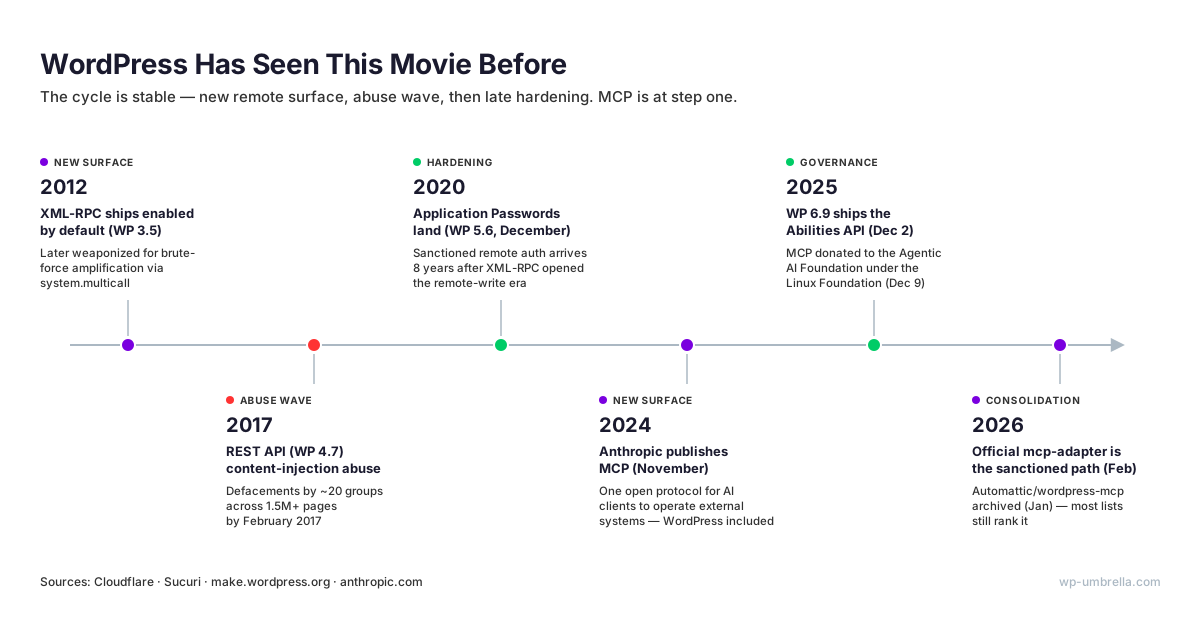
XML-RPC shipped enabled by default in WordPress 3.5 in 2012. Attackers eventually weaponized its system.multicall method to amplify brute-force attacks, packing hundreds of password guesses into a single request. Today the endpoint is routinely disabled outright, and Cloudflare ships a dedicated WAF rule for it.
The REST API repeated the arc. It landed in WordPress 4.7, and by February 2017 a content-injection vulnerability had fed defacement campaigns by roughly 20 groups across more than 1.5 million pages.
The hardening always arrives, just late. Application Passwords, the sanctioned way to authenticate remote applications, only landed in WordPress 5.6 in December 2020: eight years after XML-RPC opened the remote-write era. The pattern is stable. New remote surface, abuse wave, then hardening. MCP is at step one, and you should plan like it.
Hardening Client Sites Today
Official adapter guidance is blunt: MCP clients “act as logged-in WordPress users”. Treat every server as a user account operated by something unusually obedient and unusually literal.
Create a dedicated MCP user per site with the minimum viable role, and never wire __return_true into the permission callback of a destructive ability. Rank authentication by blast radius: OAuth 2.1 beats JWT, and JWT beats Application Passwords, which are long-lived Basic-auth credentials carrying the full privileges of their user. If you must use them, the scoping happens at the user level. So scope the user.
Default to read-only tools, and prove value on staging before granting any production write access. That mirrors the official mcp-adapter recommendation, and it turns MCP from a liability question into a controlled rollout. For the layers beyond MCP itself, credentials, agent workflows, and monitoring, see our guide to broader AI security hardening for WordPress.
Compressed to a checklist:
- A dedicated least-privilege user per site.
- OAuth where the server supports it.
- No
__return_trueon anything destructive. - Read-only by default.
- Staging before production.
- A quarterly re-check of the server’s repository health.
Six lines. They convert most of the research above from threat into housekeeping.
Setup and Production Realities
STDIO versus Streamable HTTP looks like a spec detail. It is an operations decision. STDIO runs the server as a local process on each machine: a config file and a credential set on every laptop, for every site it manages. One developer and three sites is fine. A five-person team across 50 client sites is 250 credential placements with no central revocation.
Streamable HTTP inverts that: one hosted endpoint, centrally authenticated, centrally revocable. It is also the price of ChatGPT compatibility, since ChatGPT connectors require remote servers, supported in developer mode since September 2025. For clients that only speak STDIO, Automattic’s mcp-wordpress-remote proxy bridges a local process to a remote endpoint.
The decision rule is short. If more than one person, or more than a handful of sites, will ever use the server, treat Streamable HTTP as the default and STDIO as a developer convenience.
Retrofitting transport later means re-issuing every credential you ever placed.
Client setup itself is table stakes. Claude Desktop takes a JSON entry in its mcpServers config block; Cursor uses the same pattern per project or globally; ChatGPT connects through its connectors interface, remote only. Budget minutes for configuration. The real time cost is credential hygiene, not JSON.
Put rotation policy in the plan on day one. Application Passwords do not expire on their own, so set calendar-driven rotation and revoke on staff changes, the same discipline you already apply to hosting logins.
Then plan for failure modes before the first client demo. One practitioner write-up on WordPress AI agents reports agents rewriting surrounding content roughly 20% of the time when asked for a targeted edit. That is commentary, not a benchmark, but it matches what agencies describe in early pilots.
Page builders raise those stakes: Elementor stores layouts as serialized PHP arrays, Bricks stores JSON, Divi stores shortcodes. A generic REST write that ignores the serialization turns a built page into HTML soup, and no undo inside the AI client will reassemble it.
Mitigations exist and are unglamorous. Prefer write tools that target structured fields (title, excerpt, metadata) over raw content blobs, keep page-builder pages read-only, and route bulk edits through drafts a human promotes. This is the same change control agencies already sell inside care plans, applied to a new operator.
The agency posture that emerges is caution, not refusal. On WP Tavern’s podcast, agency owner Matt Schwartz describes exactly that: real AI adoption, kept away from client production until the workflow proves itself. Staging first is not conservatism. Right now it is simply the best practice.
What If You Manage 30 or 300 Client Sites?
Everything above holds. For deep work on a single site (drafting content, restructuring navigation, debugging a template), a hardened MCP server is the right choice, and the rankings stand. Fleet operations are a different job. The question stops being “what can an AI do on this site?” and becomes “what is true across all of them?” That is breadth, not depth.
The Adoption Gap
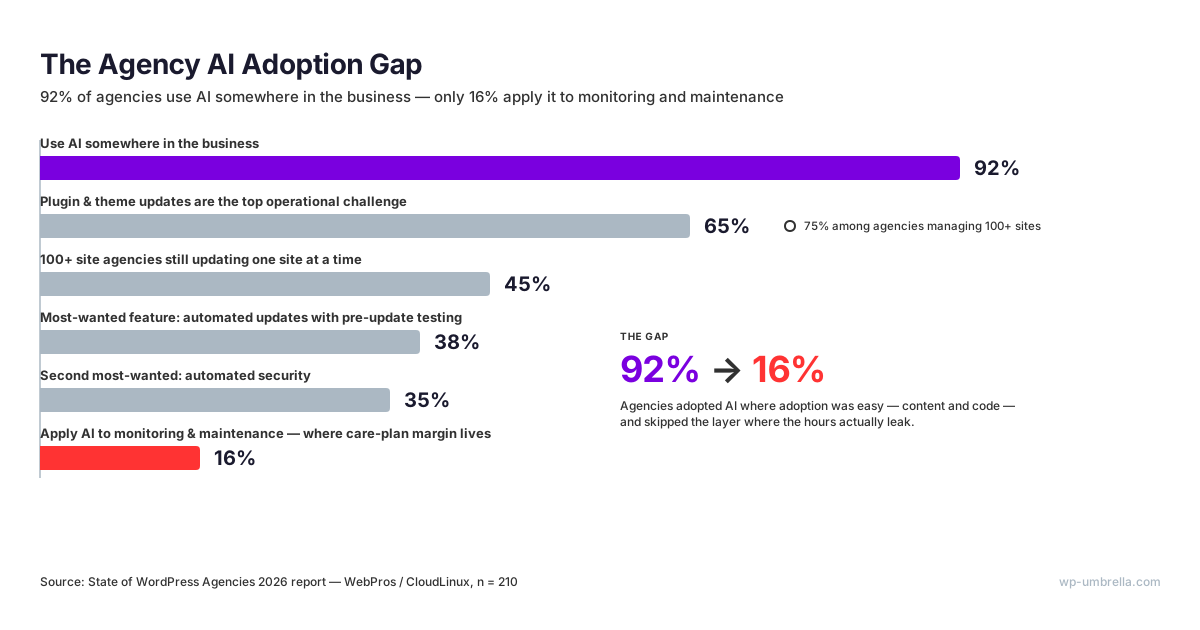
The State of WordPress Agencies 2026 report (WebPros/CloudLinux, n=210) puts numbers on that gap: 92% of agencies now use AI somewhere in the business, but only 16% apply it to monitoring and maintenance. The blind spot sits exactly where care plan margin lives.
Updates are the pressure point.
65% of agencies call plugin and theme updates their top operational challenge, and among agencies managing 100+ sites the figure reaches 75%. The workflows have not caught up with the workload: 45% of those 100+ site agencies still update one site at a time. Asked what they want most, agencies put automated updates with pre-update testing first, at 38%. Automated security came next at 35%.
Meanwhile WP Engine’s agency research (n=214) finds that 68% of clients now initiate AI conversations themselves. The demand arrives on its own; the operational win is hiding in the maintenance layer.
Read those numbers as a sequencing instruction. Agencies adopted AI where adoption was easy, in content and code, and skipped the layer where the hours actually leak. The tooling explains the gap: chat assistants ship with writing ability built in, while maintenance automation needs infrastructure underneath it.
Why Single-Site MCP Servers Stop Scaling
The per-site model multiplies everything by N. Thirty client sites means 30 server deployments or configs, 30 credential sets to issue and rotate, and 30 more things to patch when the next MCP CVE lands. None of that produces client value. It is overhead that grows linearly with your roster.
Credential sprawl also compounds the security math from earlier: every additional config is another place a long-lived password sits in plain text, and every teammate’s laptop joins the attack surface.
The deeper limit is structural: per-site servers cannot see across sites. “Which client sites are down right now?” “Which ones carry a critical vulnerability?” “Which failed last night’s backup?” Those are the questions that run a care plan business, and in a per-site model there is no place to even ask them. The aggregation layer does not exist.
Fleet-Level AI Runs on Infrastructure
That aggregation layer is what a management platform provides. WP Umbrella already manages 70,000+ WordPress sites for 5,000+ agencies, consolidating updates, backups, uptime, PHP errors, vulnerabilities, and client reporting in one dashboard, with one API underneath.
For AI, WP Umbrella publishes umbrella-skill, a Claude Skill built on the WP Umbrella public API. To be precise about the category: umbrella-skill is not an MCP server. It is a Claude Skill that teaches Claude to operate WP Umbrella’s API, so the AI inherits the fleet view instead of juggling 50 separate site connections.
In practice, that means fleet queries in plain language: which sites are down, which carry critical vulnerabilities, which failed backups overnight.
Write operations follow the platform’s safe-update workflow: backup first, then update, then health check, with rollback on failure. WP Umbrella has executed 5M+ safe updates under that discipline.
The default posture is read-only, mirroring the hardening guidance from the MCP sections above. The difference is architectural. You review one credentialed integration with scoped API access, instead of N server configs with N WordPress users to audit. The security review happens once, not per site.
Vendor case studies point the same direction, and they should be weighed as vendor case studies. Pressable reports that its team used Claude to clean 45 compromised sites in days rather than months, and that agency Getfused triaged inbound email across 170+ client sites the same way.
The economics stay flat as the roster grows: pricing is EUR 1.99 per site with every feature included, so the fleet layer costs the same per site at 30 sites or 300, and the AI layer on top of it is published openly on GitHub.
If your roster is measured in dozens of client sites, put the fleet layer in place first: one system across every client site, with AI on top of it rather than wired into each site separately. Start your free trial. No credit card required.
Which WordPress MCP Server Should You Choose?
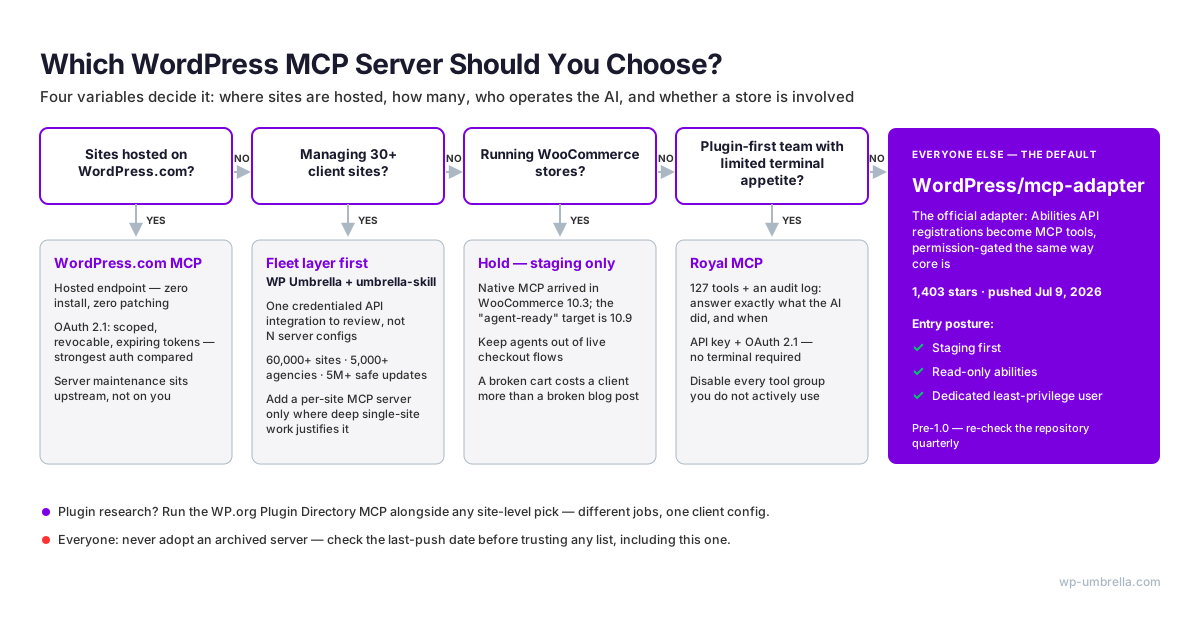
Four variables decide it: where the sites are hosted, how many there are, who on the team will operate the AI, and whether a store is involved. The scenarios below compress those into the situations we actually see at agencies.
- Solo developer on your own sites: WordPress/mcp-adapter. Staging first, read-only abilities, dedicated user. You are the ideal early adopter, because the blast radius is your own.
- Sites hosted on WordPress.com: WordPress.com MCP. Zero install, OAuth 2.1, and the maintenance burden sits upstream where it belongs.
- Plugin-first team with limited terminal appetite: Royal MCP. The audit log gives you accountability per action, and OAuth beats pasting Application Passwords into config files.
- Plugin research and development workflows: the Plugin Directory MCP, running alongside whatever site-level server you already use.
- WooCommerce stores: hold. Native MCP exists from 10.3, but the agent-ready target is 10.9; test on staging and keep agents away from live checkout.
- Agency with 30+ client sites: fleet layer first, umbrella-skill on the WP Umbrella API, then add a per-site MCP server only where deep single-site content work justifies its setup and hardening cost.
- Everyone: never adopt an archived server, and check the last-push date before trusting any list. Including this one; that is why it carries a stamp and a quarterly re-check.
The through-line is scope discipline. Every server on this page is, functionally, a user account operated by software that does exactly what it is told, including the wrong thing. Choose the smallest capability that solves the actual job, grant the least privilege that makes it work, and re-check the repository before every expansion of scope.
And put a review date in the calendar. In this ecosystem, six months is a generation: two of the nine servers on this page were retired within roughly a year of their peak visibility. A choice you do not revisit is a dependency you have stopped managing.
Frequently asked questions about backup plugins
A WordPress MCP server does not slow down your site for visitors, because it only performs work when an AI client calls a tool. Hosted endpoints and STDIO servers run entirely outside WordPress. Plugin-based servers add load only per tool call, comparable to a REST API request. The realistic constraint is host rate limiting during bulk operations, not page speed.
Yes, plugin-based MCP servers like WordPress/mcp-adapter and Royal MCP run on shared hosting, because they install inside WordPress like any other plugin. The real requirement is WordPress 6.9 or later for the adapter, which depends on the Abilities API. Some shared hosts still interfere, with WAF rules or rate limits that block MCP traffic, so verify on one site before rolling out. Standalone STDIO servers avoid the question entirely; they run on your machine.
An MCP server does not replace the WordPress REST API: it sits on top, translating your site’s capabilities into typed tools that any AI client can discover and call. Most servers on this list execute their tool calls as ordinary REST requests or Abilities API invocations. The practical difference is who consumes it. REST serves developers writing code, while MCP, published by Anthropic in November 2024, serves AI agents at runtime.
No, the plugin and hosted paths require no code: Royal MCP installs from the wordpress.org directory, and WordPress.com MCP connects by pasting a URL and approving an OAuth prompt. Standalone STDIO servers are the exception, since they assume comfort with JSON config files and a local runtime. What you cannot skip is the operational judgment: user roles, credential rotation, and staging discipline matter more than code.
WP Umbrella ships its AI integration as umbrella-skill, a Claude Skill built on its public API, rather than as a per-site MCP server. The distinction matters in practice: a WordPress MCP server exposes one site’s actions as tools, while WP Umbrella’s API already aggregates every connected site, so one integration covers the whole fleet — the architecture argued for in the fleet section above. And because the skill is built on the platform’s published OpenAPI spec, teams that want MCP specifically can expose the same fleet API as MCP tools through standard OpenAPI-to-MCP bridging.
Conclusion
Three takeaways survive contact with the data. First, WordPress/mcp-adapter is the default for single-site work: official, active, built where the standard is set, with read-only abilities on staging as the entry posture. Second, the threat model is real but manageable: OAuth where possible, least-privilege users, staging before production. Third, fleets need a different layer, because per-site servers cannot aggregate.
The rankings above will drift; that is the nature of a protocol this young, and no list is exempt. We re-pull the repository data and re-verify this page quarterly, so the date at the top is part of the recommendation.
If you bookmark one thing, bookmark the method: last-push date, auth model, tool scope. Those three checks will outlive every name on this page.
If you manage client sites in bulk, the fastest safe win is the fleet layer: one platform across every client site, with the AI on top. Start your free trial. No credit card required.