
10 Essential Features to Look for in a WordPress Security Management Tool

A proper WordPress security management tool should provide centralized visibility, scheduled vulnerability scanning, clear prioritization, and ways to prevent exploits before they occur, without relying on heavy plugins or reactive cleanup. This guide breaks down the 10 essential features for managing WordPress security at scale.
This article outlines the 10 most important features to look for in a WordPress security management tool, especially if you’re responsible for multiple client websites. The features covered reflect how security is managed in agency and freelance workflows. Each one addresses a specific operational requirement that becomes critical as the number of managed sites grows.
Top 10 Features to Look for in a WordPress Security Management Tool
1. Scheduled vulnerability scanning
Vulnerability discovery is time-sensitive. New issues are disclosed publicly, and once they are, the window between disclosure and exploitation is often short. Add to this, agencies rarely use unique stacks across clients. The same plugins and themes appear repeatedly, which means a single vulnerability can affect many sites at once. If discovery depends on occasional reviews or memory, exposure increases silently.
A WordPress security management tool should account for this reality by scanning sites automatically on a fixed schedule. That means checking WordPress core, plugins, and themes against a maintained vulnerability database without requiring manual intervention.
Scheduled scanning also changes how security work feels day to day. Vulnerabilities surface during routine monitoring rather than as interruptions discovered mid-task. That shift reduces urgency-driven decision-making and makes remediation easier to plan.
When evaluating tools, the key question is simple: Will vulnerabilities appear automatically, or do they rely on someone remembering to check?
2. Centralized Security Visibility
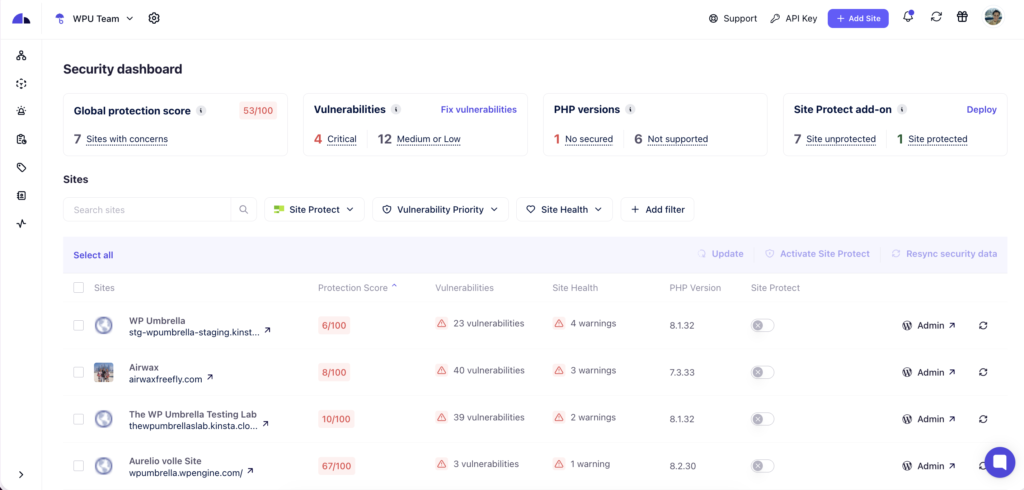
A centralized security dashboard exists to answer a basic operational question: Are the same security standards applied on all sites? Without a single view, teams rely on assumptions.
Recently updated sites receive attention. Older or quieter sites receive less. Over time, this creates uneven coverage even when processes are well-intentioned. A security management tool should remove that uncertainty by aggregating security signals into one interface. Known vulnerabilities, configuration risks, insecure PHP, and protection coverage should be visible without logging into individual sites or hosting dashboards.
This kind of visibility supports routine review. Teams can confirm alignment, identify gaps, and address them before they become client-visible issues. If a tool requires site-by-site inspection to understand overall exposure, it will not scale cleanly.

Try the New Bulk Security Dashboard in WP Umbrella
If you manage multiple WordPress sites, the new Bulk Security Dashboard in WP Umbrella lets you review vulnerabilities, PHP versions, protection coverage, and overall exposure from a single place.
Instead of checking sites one by one, you can identify risks across your entire portfolio and act before they become client-visible issues. Try the Bulk Security Dashboard in WP Umbrella and see how centralized security visibility changes day-to-day maintenance workflows.
3. Vulnerability Severity and Clear Prioritization
Not all vulnerabilities carry the same risk, and security tools should reflect that reality.
A WordPress security management tool should distinguish between vulnerabilities based on severity. Some issues require immediate action because they are easy to exploit or have a high impact. Others represent lower risk and can be scheduled without urgency.
When severity is unclear, every alert feels equally important. That leads to noisy workflows and reactive decision-making. Teams either overreact to low-impact issues or miss the urgency of critical ones buried in long lists.
Severity-based prioritization enables teams to assess exposure, identify what needs attention now, and plan remediation work without relying on intuition or guesswork. Over time, this creates a more consistent response to risk on all sites.
4. A Global Security Score
As the number of client websites grows, teams need a way to understand the overall security posture without reviewing each site individually.
A global security score provides that overview. It estimates how exposed a WordPress site is to known security risks based on its current state. This includes factors such as unresolved vulnerabilities, outdated PHP or WordPress versions, configuration issues, SSL certificate expiry, and whether protective measures are enabled.
This score does not indicate whether a site has been compromised. But rather, it highlights whether conditions exist that increase the likelihood of exploitation.
A security score supports trend tracking and consistency checks. Teams can see whether exposure is improving or deteriorating over time and identify sites that fall outside acceptable baselines. This is useful during routine reviews or when onboarding new client websites.
A meaningful protection score should be transparent in how it is calculated and grounded in observable signals. Without that clarity, scores become decorative rather than operational.
Read how WP Umbrella calculates your global security score.
5. Virtual Patching to Reduce Exposure Before Updates Are Applied
Plugin and theme updates are not always immediately available when a vulnerability is disclosed. Even when they are, applying updates across multiple sites often takes time.
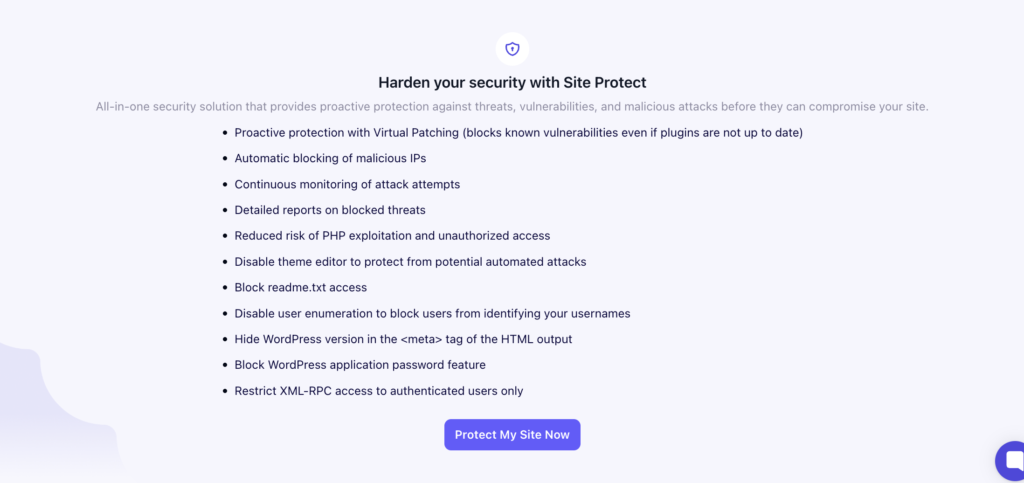
A WordPress security management tool should account for that gap by offering virtual patching. Virtual patching blocks known exploits at the PHP level, reducing exposure while teams decide when and how to apply updates.
This matters in real-world workflows where updates are scheduled, tested, or coordinated with clients. Without an additional protection layer, sites remain exposed during that window, even when teams are aware of the risk.
Virtual patching shifts the role of updates. Instead of being the only line of defense, updates become part of a controlled maintenance process rather than an emergency response. This reduces pressure on teams and allows security work to fit into existing workflows.
When assessing security tools, it’s worth understanding whether protection depends on immediate updates or whether there is a mechanism in place to reduce risk while updates are pending.
6. WordPress Site Health and Configuration Risk Monitoring
Security issues are not limited to code vulnerabilities. Many risks come from configuration choices that are easy to overlook and difficult to spot once a site is live.
A security management tool should monitor WordPress site health and configuration signals that affect exposure. These include outdated PHP versions, enabled debug settings, exposed log files, and misconfigurations that surface warnings in the WordPress backend.
These issues often don’t break a site outright, which is why they persist. Clients may see warnings they don’t understand, or sensitive information may remain accessible longer than intended. Over time, this increases risk and creates unnecessary support conversations.
By centralizing these signals, WordPress security tools make configuration hygiene part of routine maintenance rather than occasional cleanup. Teams can address issues early and explain changes clearly to clients.
7. PHP Version Visibility of all Sites
PHP versions have a direct impact on security and compatibility, yet they are often managed outside of WordPress itself. A WordPress security management tool should surface PHP version information across all connected sites in one place. This removes the need to log into individual hosting dashboards or rely on periodic manual audits.
When managing multiple sites, PHP alignment tends to drift. Some sites are upgraded, others are not, often depending on the hosting provider or legacy setup. Without centralized visibility, outdated or unsupported PHP versions persist unnoticed.
By making PHP version status visible across websites, security reviews become simpler and more reliable. Teams can identify misalignment quickly and address it as part of routine maintenance rather than incident response.
8. SSL Certificate and Domain Expiration Monitoring
Expired SSL certificates and domains create immediate problems that are difficult to explain after the fact.
A security management tool should continuously monitor SSL certificate validity and domain expiration dates and surface upcoming expirations early. This allows teams to act before browsers show warnings or sites go offline.
These issues are not complex to fix, but they are easy to miss when managing multiple sites. When they surface late, they often arrive as urgent client messages rather than routine maintenance tasks.
9. Real-Time Security Alerts
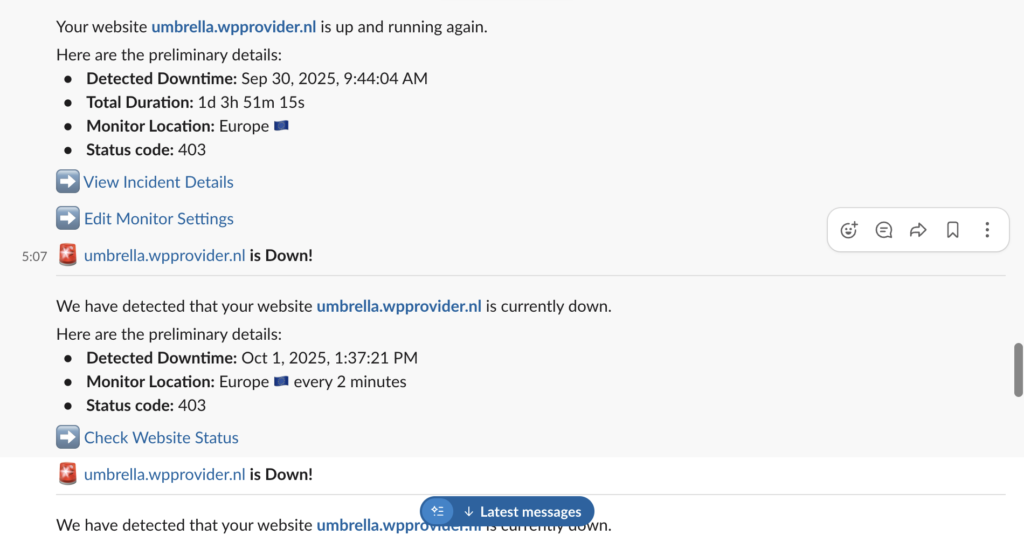
Security signals lose value when they arrive too late or in the wrong place.
A WordPress security management tool should provide real-time alerts for meaningful events such as newly discovered vulnerabilities or other website issues. These alerts should integrate with channels teams already use, such as email or Slack.
The goal is awareness, not interruption. Alerts should support timely action without overwhelming teams with noise. When alerts are aligned with the risk, they reinforce trust in the system rather than contributing to alert fatigue and let teams stay informed without actively monitoring dashboards throughout the day.
10. Bulk Actions for Fixing and Protecting Multiple Sites
Visibility without action creates friction. A security management tool should allow teams to act directly from the same interface where risks are reviewed. This includes applying bulk updates, enabling protection, or triggering rescans across multiple sites at once.
Bulk actions reduce repetitive work and support consistency. Instead of addressing the same issue site by site, teams can apply changes at the portfolio level while maintaining control over what is executed. This capability saves a lot of time and ensures security standards can be applied immediately without creating additional operational overhead.
What’s Important in WordPress Security Management
WordPress security management is about maintaining a clear and consistent baseline across all sites you are responsible for.
The features covered in this article reflect that reality. Scheduled vulnerability scanning, centralized visibility, prioritization, prevention, and bulk execution exist to reduce uncertainty. They allow teams to understand exposure at any moment and address it as part of routine operations rather than emergency response.
When evaluating a WordPress security management tool, the key question is whether it helps you maintain that baseline as you scale. Tools that rely on manual checks or fragmented views make security dependent on attention. Tools designed for scale make security repeatable.
If you manage multiple WordPress sites, the difference becomes visible quickly.
If you want to see how this works in practice, you can try the WP Umbrella and its bulk security dashboard, which brings vulnerability visibility, bulk updates, protection coverage, and remediation into a single workflow.
FAQs about WordPress Security Management Tools
A WordPress security management tool centralizes security monitoring and actions across multiple WordPress sites. It surfaces known vulnerabilities, configuration risks, and protection status in one place so teams can maintain consistent security standards without checking each site individually.
That depends on how security is handled. Some protections are better applied at the hosting or DNS level. A security management tool focuses on visibility, vulnerability prevention, and configuration hygiene across sites rather than running heavy scans or cleanup routines inside each WordPress installation.
Security scans should run on a fixed schedule and update automatically as new vulnerabilities are disclosed. In multi-site environments, relying on manual or occasional scans increases exposure because risks are discovered inconsistently.
Virtual patching blocks known vulnerabilities at the PHP level before updates are applied. It reduces exposure during the period between vulnerability disclosure and plugin or theme updates, which is common in real maintenance workflows.
Agencies manage WordPress security at scale by using centralized dashboards that provide visibility across all sites. This allows teams to review exposure, prioritize work, and apply protections consistently without relying on site-by-site audits.