
What State of the Word 2025 Means for WordPress Agencies

State of the Word 2025 (SOTW) confirmed several concrete shifts: WordPress 6.9 is now live, AI is becoming part of core workflows through new APIs, and the update process for plugins is changing in ways that affect day-to-day operations.
The keynote placed all of this on the table, and this article breaks down the direct consequences for anyone responsible for keeping WordPress sites stable.
TL;DR
Here are the major milestones highlighted this year in WordPress 6.9:
- WordPress 6.9 “Gene” released live on stage
- 900+ contributors, with 230 first-timers
- Major improvements to collaboration, drag-and-drop, accordion block, aspect-ratio controls, and command palette
- The first real wave of AI-native WordPress APIs: Abilities API, AI Client, MCP adapter
- Block editor gains notes, bringing true multi-user workflows closer
- Plugin review queue down to <7 business days, thanks to AI-assisted scanning
- 24-hour safety window added to auto-updates
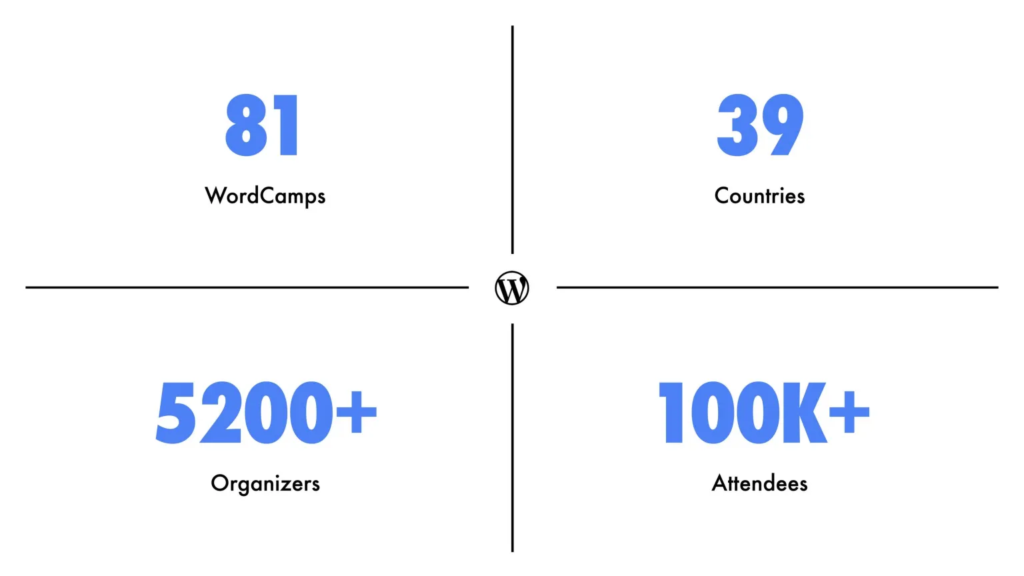
- Expansion of Campus Connect and major growth in global WordCamps
- More than 56% of WordPress sites now non-English, signaling global maturity
Watch the event on-demand:
What’s new in WordPress 6.9 Gene release: notable features for client work
WordPress 6.9 brings 340 enhancements and fixes, but five stand head and shoulders above the rest for agency workflows.
The block notes system transforms client feedback loops. Instead of screenshot-heavy emails or Loom videos pointing at problems, stakeholders can now comment directly on specific blocks within the editor. Comments attach to content elements, not arbitrary page positions. When you select a note, the relevant block highlights while everything else fades, making context crystal clear. Email notifications trigger when new notes arrive, keeping async collaboration moving.
Drag-and-drop improvements eliminate the hunt for drag handles. You can now grab images, list items, and blocks directly to reorder them. Building galleries becomes a matter of dragging images side by side. The friction reduction here compounds. What used to take multiple clicks and precise targeting now happens intuitively.
The new accordion block supports inner blocks, meaning unlimited customization potential without custom development. Combined with the command palette, now accessible throughout WP Admin (not just the editor), these additions significantly speed up site-building and management tasks.
For design consistency, gallery blocks gained aspect ratio controls, a simple addition that eliminates hours of CSS tweaking to make image grids align properly.
How WordPress AI integration works
The WordPress AI team shipped all four foundational building blocks in 6.9.
The Abilities API creates a unified registry of logic that allows both humans and AI systems to understand what can be done on WordPress.
The WP AI Client (WordPress AI Client) provides an abstraction layer for AI models. Developers write prompts once, and site owners can configure their preferred AI provider, or multiple providers.
The MCP (Model Context Protocol) adapter version 0.3.0 enables WordPress to connect to third-party services such as Claude, OpenAI, and others. The demo showed it reading site statistics from Jetpack and providing content recommendations.
The AI Experiments plugin is now available on the WordPress repository at wordpress.org/plugins/ai, showcasing these capabilities with practical features.
What the 24-hour plugin update safety window means for site maintenance
The new safety window fundamentally changes plugin update risk management. When developers release updates, manual installations can grab them immediately. But sites with auto-updates enabled wait 24 hours.
This buffer creates an early-warning system. If an update breaks something, the manually updating users (typically developers and power users) catch it first. Plugin authors have a full day to hear feedback and push fixes before the update rolls out to millions of auto-updating sites.
This represents phase one of a larger rollout system. Matt Mullenweg confirmed percentage-based rollouts are coming, similar to how Google Play Store and iOS App Store handle updates. Developers will eventually release to 10% of users, monitor, then expand to 50%, and finally to 100%.
For agencies, this means adjusting maintenance windows and client communications. Critical security updates still need immediate attention, but feature updates gain a natural testing period.
WordPress’s global expansion and the developer talent pool
WordPress crossed a significant threshold: 56% of WordPress sites now run in languages other than English. Japan alone accounts for 58.5% of all Japanese websites and 83% of that country’s CMS market share.
The talent implications are substantial. Campus Connect, piloted at Universidad Fidélitas in Costa Rica, now has students earning academic credit for WordPress contributions. The program expanded across universities globally, creating a pipeline of formally trained WordPress developers entering the workforce.
Youth Day Nicaragua saw 75 participants aged 8-20 building WordPress sites, with sessions led by teenagers teaching other teenagers. This peer-to-peer learning model is replicating across Latin America, Asia, and Europe.
For agencies, this means access to a dramatically expanding talent pool with formal WordPress training. The combination of university programs and youth initiatives creates both immediate contractor availability and long-term hiring pipelines.
Next steps: what WordPress agencies should do
Based on State of the Word 2025’s announcements, here’s your action list:
Technical preparation: Install WordPress 6.9 on staging sites. Test the block notes system with your team. Download the AI Experiments plugin (wordpress.org/plugins/ai) to understand capabilities before client conversations start.
Process updates: Document your new 24-hour update window procedures. Adjust maintenance schedules to account for the safety buffer. Create client communication templates explaining the new collaborative features.
Strategic planning: Evaluate which AI features solve your biggest workflow bottlenecks. Whether it’s content generation, alt text creation, excerpt writing, code review, or accessibility recommendations, identify where the 10x improvement opportunities exist in your current processes.
Team development: Start learning the Abilities API documentation. If you’re building custom solutions, understanding this foundation positions you ahead of the integration curve. The WordPress AI team specifically requested that developers explore these tools and provide feedback.
The State of the Word made clear that WordPress is building infrastructure for an entirely new way of working with websites. Agencies that adapt these tools thoughtfully, rather than reactively, will find themselves with significant competitive advantages in 2026.
Frequently asked questions about SOTW
The Abilities API is a unified registry of WordPress functions that both humans and AI systems can understand. It provides a standardized list of what can be done on WordPress, what information is needed, and expected outcomes for each action.
When plugin developers release updates, sites with manual updates can install immediately, but sites with auto-updates enabled wait 24 hours. This allows early adopters to catch and report issues before updates roll out to millions of sites automatically.
The AI Experiments plugin is available at wordpress.org/plugins/ai. It showcases current AI capabilities, including alt text generation, excerpt creation, and content tone adjustment.