Harden client sites, catch real threats early, and manage security at scale from one dashboard, without turning maintenance into a constant emergency.
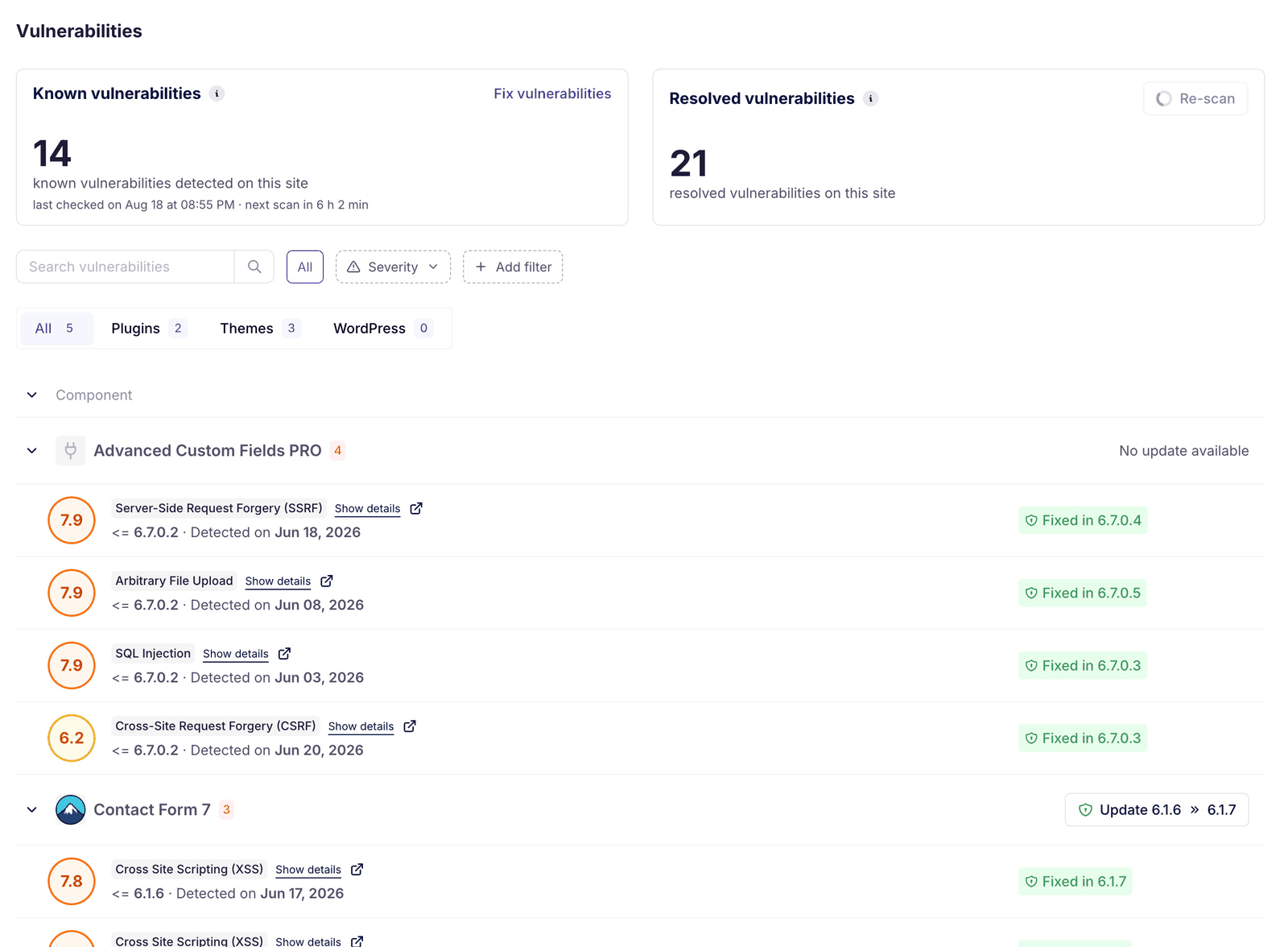
WP Umbrella scans every site in your portfolio every 6 hours for known vulnerabilities affecting WordPress core, plugins, and themes. Scans are powered by Patchstack, one of the leading WordPress vulnerability databases, which tracks and discloses CVEs across the WordPress ecosystem in real time. Each detected vulnerability is surfaced directly in your dashboard with enough context to act: severity level, affected component, and the version that fixes it, with the fixing update one click away. You can also re-scan on demand instead of waiting for the next automatic check. All of this is included on every plan.
Vulnerabilities are ranked by severity so you can prioritize: a critical vulnerability gets your attention immediately, while a low-risk issue on a staging environment can wait for the next maintenance window. This lets agencies manage security across 50 or 500 sites without treating every alert as an emergency.
Per-site toggles close the doors attackers try first: hide your WordPress version, block user enumeration, mask login error messages, disable the file editor, add security headers, rate-limit login attempts, disable XML-RPC, and protect your uploads folder. Every site gets the same baseline protection, and warnings you have consciously accepted can be dismissed so Site Health stays a real to-do list.
When a vulnerability is discovered but no patch is available yet, or when updating immediately isn't safe, the Security add-on's firewall applies virtual patching (powered by Patchstack): it blocks exploit attempts targeting the known vulnerability without modifying the plugin or theme code itself. The insights view shows the attacks blocked over the last 30 days, the top blocked IPs, and the rules that caught them, proof you can put in front of clients. The Security add-on replaces in-WordPress security plugins like Wordfence, Sucuri, or Solid Security, with no impact on site performance. It does not replace network or server-level firewalls, which remain part of your hosting infrastructure.
WP Umbrella watches login attacks across every site on the platform and continuously builds a shared blocklist of malicious IP addresses. Once an IP is flagged anywhere on the network, it is blocked on your login page in advance, before it ever reaches your site.
Detections run on the sites themselves across eight checks: brute-force attempts, new admin accounts, sign-ins from new locations, file integrity, critical settings changes, mass content deletion, hidden administrator accounts, and .htaccess changes. Every alert carries its evidence: the accounts involved, the IPs, the timeline, and a recommended response. A searchable stream below records every event.
A daily scanner flags known malicious files, so an infection that slipped past prevention stops being invisible. Files you have verified yourself can be dismissed into their own list. And if the scanner flags a real infection, malware cleanup is available on demand: contact support and our team handles the removal with you.
Every account gets the visibility and hygiene layers: vulnerability monitoring, Site Health checks, and the security hardening toggles.
The Security add-on is the active protection layer on top. Enabling it turns on four components together, with sensible defaults:
Each piece can then be adjusted per site. 10,000+ sites already run it, and because it is priced per site, you protect the sites that need it without paying for the ones that don't.
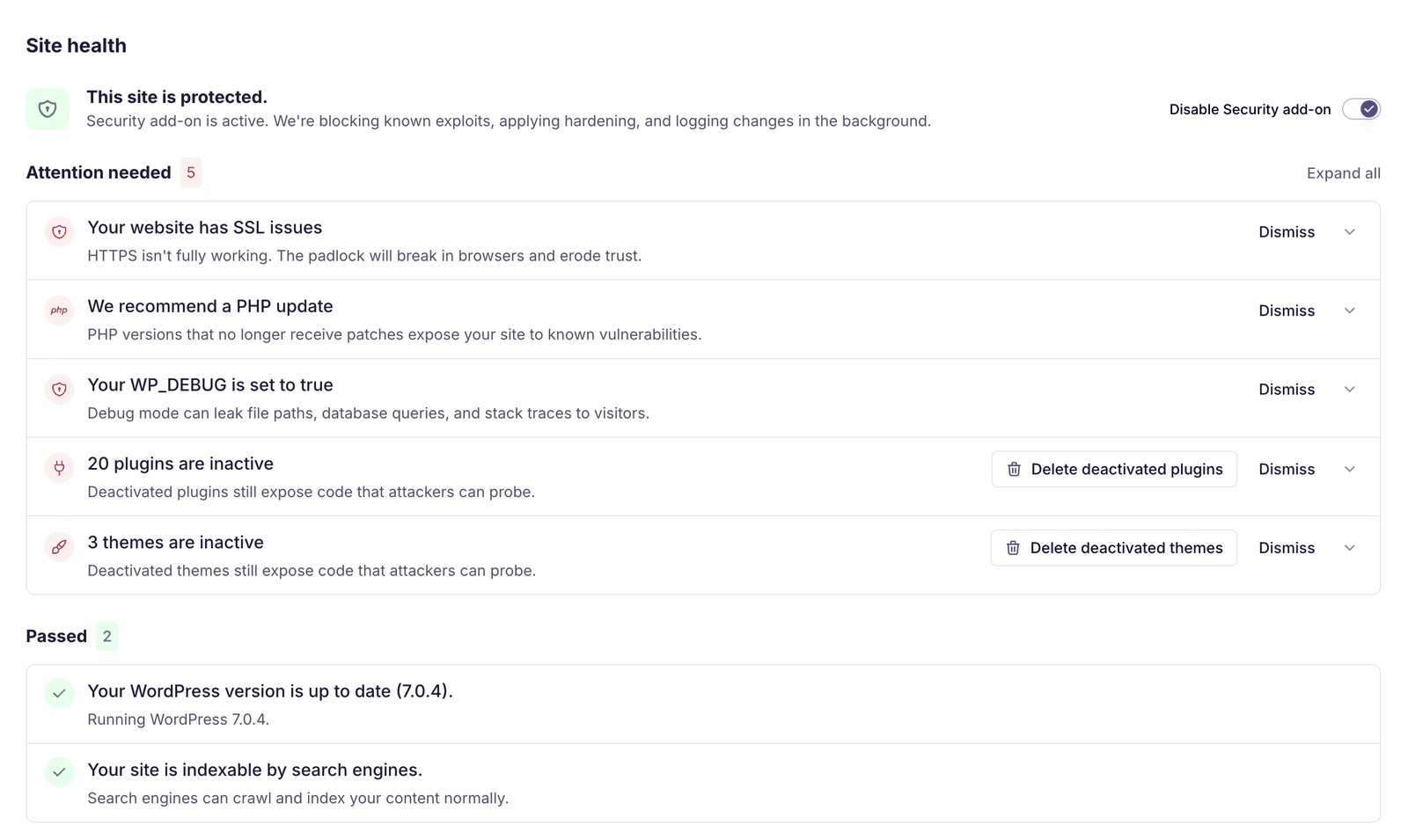
Most agencies start with the visibility layer that every plan includes: vulnerability monitoring across all client sites, hardening toggles switched on, and Site Health warnings triaged.
From there, the routine settles in:
As portfolios grow, security becomes about prioritization and consistency, not reacting under pressure.
Security works best when combined with:
Together, they turn security into a predictable part of your maintenance process.
Join thousands of agencies and freelancers who trust WP Umbrella
I used ManageWP for years, but I felt like it just got outdated. I had issues with their support which made me lose hope and that's when I moved to WP Umbrella.
 Jeffrey Dalrymple · Founder @ Lytbox
When a Cloudways customer asks us what the best WordPress management tool is, we are happy to recommend WP Umbrella.
 Muhammad Saad Khan · Product Marketing @ Digital Ocean
After trying virtually every management tool out there, I've fully moved my agency to WP Umbrella, and I'm convinced I won't need to look further.
 Kyle Van Deusen · Founder @ The Admin Bar
Most agencies start with the security visibility included on every plan, then enable the Security add-on on the client sites where active protection matters most.
WP Umbrella detects known vulnerabilities affecting WordPress core, plugins, and themes, using trusted vulnerability data sources like Patchstack.
Virtual patching blocks exploit attempts targeting a known vulnerability at the firewall level, before the fixing update is applied or even released, without modifying plugin or theme code. It buys agencies time to plan and test a proper update without leaving sites exposed. The durable fix is still the update.
Every plan includes vulnerability monitoring (checked against the Patchstack database every 6 hours, with one-click fixing updates), Site Health checks with dismissible warnings, the security hardening toggles, the platform Activity Log, and uptime, PHP error, and performance monitoring. The Security add-on adds the active protection layer: the firewall with virtual patching, the network-learned IP blocklist, the Security-Driven Activity Log, and daily malware scanning.
It costs 2€ or $2 per site per month, on top of the per-site subscription. Per site means you can protect the sites that need it without paying for the ones that don't. You can enable it in bulk from the dashboard or site by site from the Security tab.
It replaces in-WordPress security plugins like Wordfence, Sucuri, or Solid Security: the add-on covers the firewall with virtual patching, a network-learned malicious-IP blocklist, attack detections through the Security-Driven Activity Log, and daily malware scanning, with no impact on site performance. It works at the PHP level, so it complements DNS or CDN-level services like Cloudflare and does not replace hosting-level firewalls or DDoS mitigation.
The daily scanner lists every flagged file in the Malware section. Files you have verified yourself can be dismissed. If the scanner flags a real infection, malware cleanup is available on demand: contact support and the team handles the removal with you. Your backups remain the recovery path for the worst cases.
Yes. Security events and actions can be included in client maintenance reports to help explain risks and remediation work.
Yes. Security status and vulnerabilities are visible across your entire portfolio, allowing agencies to prioritize and act consistently at scale.
Trusted by 80,000+ sites (as of October 2026)
WP Umbrella is designed to grow with your care business, from your first maintenance clients to a mature, multi-site operation.