
Website Management Services: What They Include & How Agencies Deliver Them
Website management services cover the recurring work that keeps client sites updated & secure. Here's what they include & how agencies deliver them.

Website management services are the recurring work that keeps a site updated, secure, available, and performing properly between major projects. For an agency or freelance WordPress developer, they are a service line in their own right, and increasingly an important one.
If you are an agency trying to deliver website management services consistently across a growing portfolio, the second half of the post is about how the work gets done behind the scenes, and what makes the difference between a retainer that runs cleanly and one that consumes the team.
TL;DR
Website management services cover the recurring work required to keep a website updated, secure, available, and performing. The core components usually include plugin and core updates, automated backups with tested restore, uptime and SSL monitoring, security scanning, performance and technical SEO health, content upkeep, and client reporting. For agencies, the challenge is delivering those tasks consistently across many sites without losing visibility, quality, or margin.
What are website management services?
Website management services are the ongoing technical, operational, and support work required to keep a website healthy after it goes live. They sit between hosting (which provides the server) and design or development (which builds the site in the first place). The work is recurring, mostly invisible when it goes well, and very visible when it does not.
A typical website management retainer covers some combination of the following:
- Plugin, theme, and core software updates
- Automated backups, with the ability to restore cleanly
- Uptime and SSL certificate monitoring
- Security scanning and vulnerability response
- Performance monitoring and basic optimization
- Technical SEO health checks
- Defined support response times for things that break
- Client maintenance reporting that shows what was done
What do clients expect from website management?
A client paying for website management wants to stop thinking about their website. They want it to load, stay up, not get hacked, and not become their problem. Beyond that, they want occasional proof that someone is watching, not because they distrust the agency, but because silence and competence look identical from the outside.
Support sits inside that same expectation. A broken form, a layout issue on mobile, a redirect that stopped working after an update. These are not always major incidents, but they are part of what clients experience as website management. Clients judge the retainer on the moments when they needed help and how the agency responded.
That is why support needs clearer treatment inside the service than most agencies give it. What kinds of requests are covered, what the response time looks like, and whether support is reactive only or includes small implementation help. Leaving those undefined is where retainers start to lose their shape. When support is priced and documented properly, it becomes part of the value the client experiences directly rather than unpredictable labor the agency absorbs quietly.
What should a website management retainer include?
| Service component | Usually included in a standard website management retainer | Often treated as add-on or higher-tier work |
| WordPress core, plugin, and theme updates | Yes | Emergency out-of-hours update handling |
| Automated backups | Yes | High-frequency backups, such as hourly backups |
| Restore capability | Yes | Disaster recovery planning and post-incident analysis |
| Uptime monitoring | Yes | Multi-location checks with escalation workflows |
| SSL monitoring | Yes | Domain, DNS, and renewal management |
| Security scanning / vulnerability visibility | Yes | Active protection, virtual patching, WAF configuration |
| Performance checks | Usually | Ongoing performance optimization and Core Web Vitals work |
| Technical SEO health checks | Usually | Full SEO strategy, keyword research, content optimization |
| Small content edits | Sometimes | Large-format page building, design changes, CRO work |
| Support for minor issues | Usually | Development work, feature requests, integrations |
| Reporting | Yes | Executive reporting with analytics commentary |
The takeaway here is that website management services are not just a list of tasks. They are a combination of recurring technical work, support boundaries, and operational discipline. The more clearly those pieces are defined, the easier it is for clients to compare providers and for agencies to protect margin.
Updates
Plugin, theme, and core updates are the most visible part of website management and the most common cause of self-inflicted downtime. An update can introduce a conflict with another plugin or change the behavior of a checkout flow without any obvious warning.
Good update workflow looks like this: scheduled rather than ad hoc, run in a way that catches problems before they reach the live site, and recoverable when something does go wrong. Skipping updates is not a strategy, because the longer they wait, the more likely the next round contains a known security vulnerability. Running them blind is also not a strategy, because the cost of a broken production site usually outweighs whatever time was saved.
Backups, with tested restore
A backup that exists in theory but cannot be restored in practice is not a backup. It is a folder of files. The practical standard is automated backups running on a regular schedule, stored somewhere outside the production environment, and verified often enough that restoration is not a guessing exercise during an incident.
Uptime and certificate monitoring
When a client notices their site is down before anyone on the team does, the conversation that follows starts in the wrong place. It does not matter how fast the fix is. The impression that stays is that nobody was watching. Good monitoring includes basic up/down checks, response-time tracking, SSL expiry alerts, and visibility into PHP errors that might not take a site fully offline but are degrading it.
Security scanning and vulnerability response
Security in the context of website management is mostly about visibility and early warning. New vulnerabilities are disclosed in WordPress plugins, themes, and core software regularly. The work is knowing which of your sites are running an affected version, and getting the patch applied before someone exploits it.
It’s a continuous loop of vulnerability disclosure, identification on affected sites, and patching. Done well, it is invisible. Done badly, it results in a hacked site.
Performance and technical SEO health
Website management is not an SEO engagement. There is no keyword research, no content planning, no link building inside a maintenance retainer. But the maintenance layer touches a set of technical signals that search engines and users both care about. A site that loads slowly, returns errors, breaks layouts, or goes offline frequently will not perform well over time, regardless of how good the underlying SEO strategy is.
A bloated database, an outdated plugin, a broken caching setup, and unoptimized images all slow a site down in ways that search engines penalize. Even a routine content change can quietly introduce a performance issue if nobody checks the site afterward. The maintenance team is often the first line of defense here, even when the client labels the symptom as an SEO problem rather than a maintenance one.
Client reporting
Client reporting is easy to underestimate until you notice how much smoother renewals become when clients can see what has been done. Most maintenance work is invisible to the client. The reporting layer makes it visible, which is often the difference between a retainer that gets renewed without discussion and one that gets questioned every quarter. Reports do not need to be elaborate. They need to be regular, accurate, and readable by someone who is not technical.
How do agencies deliver website management profitably?
Three things separate agencies that deliver website management profitably from agencies that deliver it at a loss:
Centralization
When updates, backups, monitoring, security visibility, and reporting all live in different systems, the work takes more time and quietly accumulates gaps. When they live in one operational environment, the team spends less time switching contexts, and the gaps are easier to spot.
Defined scope
Retainers without clear boundaries on support, content, and emergency work are the ones that consume the team. The retainer either gets renegotiated or quietly becomes unprofitable. Defining what is covered and what is not is one of the highest-leverage things an agency can do for the maintenance line.
Tested recovery
The agencies that handle incidents calmly are the ones that have already practiced recovering from them. Backups that restore cleanly, rollback procedures that work, and a clear sense of who does what when something breaks. None of that exists by accident.
The work itself is the same work every agency does. The operating layer underneath it is what makes the work sustainable across a portfolio.
WP Umbrella: The Operating Infrastructure Behind Website Management
I’d recommend WP Umbrella to anyone who manages multiple websites…and even those who only manage one website. After all, the interface is clear and there are lots of features. Considering the cost, it’s worth it — Laurent Lebedinsky, Founder, Terre Digitale
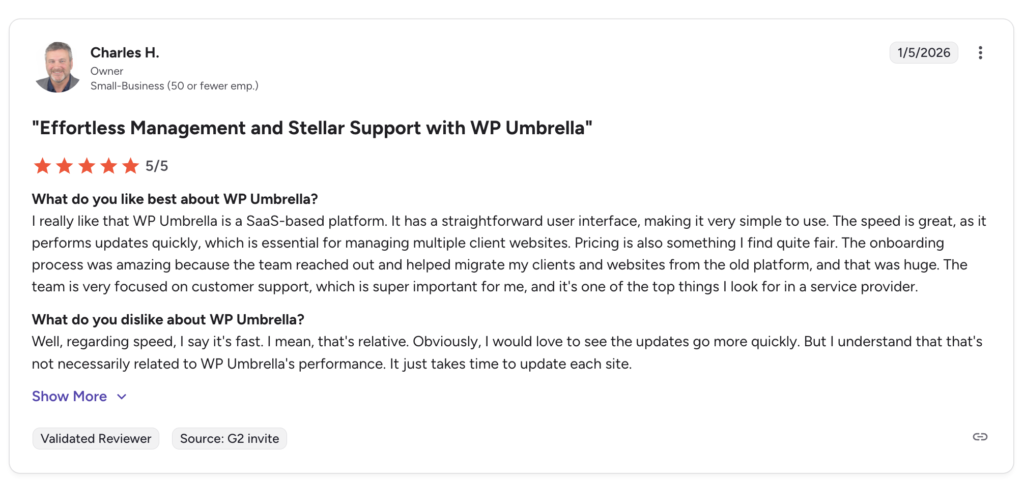
For WordPress agencies, this is the problem WP Umbrella is built to solve. It is not a website management service. It is the operational layer that lets WordPress agencies deliver their own website management services more consistently across many client sites.
The agencies using WP Umbrella are still the ones running the retainer, talking to the client, and making the judgment calls about which updates are safe to push and when. WP Umbrella sits underneath that work, consolidating the recurring tasks into a single environment so the team is not stitching together a different tool for each part of the job.
Updates and Safe Updates
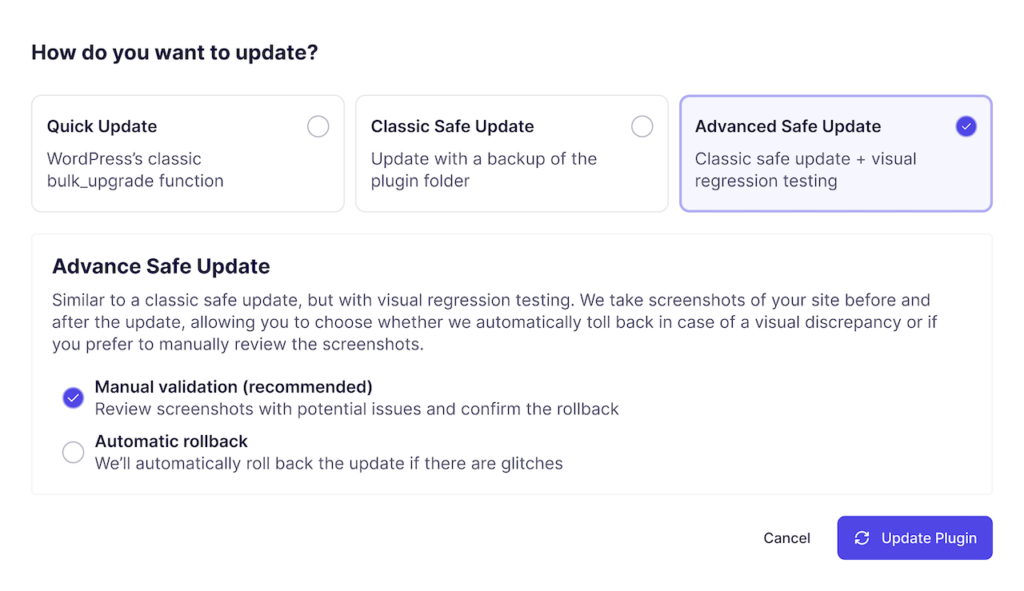
Updates are a part of maintenance where speed and caution pull in opposite directions. Running them one site at a time across a large portfolio eats hours. Running them without any safety net creates a different problem.
WP Umbrella’s answer is to stop treating every update the same way. Inside the update workflow, there are three modes the team can apply per plugin, per site, or across the whole portfolio: Quick Update, which runs WordPress’s standard update process with no additional steps.
Then there are Classic Safe updates, which create a restoration point before the update runs, checks compatibility, monitors the site’s status code and uptime after the update completes, and rolls back automatically if a server-level error like a 500 is detected. Finally, it has the Advanced Safe update that has visual regression testing on top of everything Classic Safe Update does.
Backups and recovery
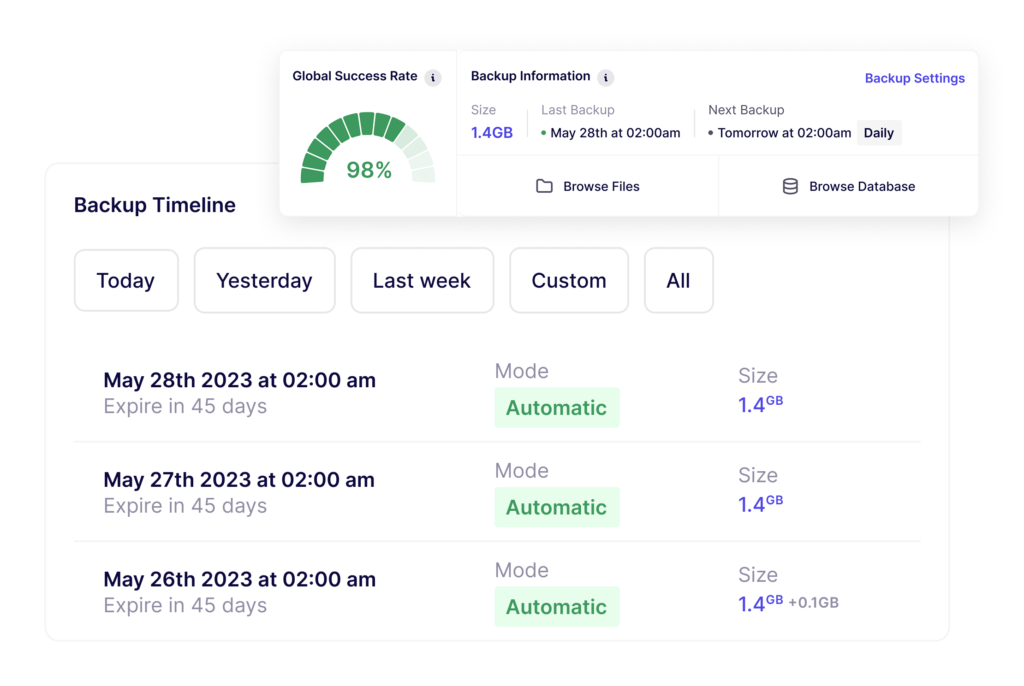
Backups are a part of website management where agencies most often confuse activity with safety. A backup that runs on schedule but has never been tested against a real restore is not a safety net. It is a folder of files and a hope.
WP Umbrella handles backups as an operational safety net rather than a checkbox. Backups are incremental, so only the changes since the last backup are stored. That keeps server load low and makes backup frequency practical on sites where a full daily archive would be too heavy. Backups are encrypted, GDPR-compliant, and stored on Google Cloud infrastructure in the EU, with a 50-day retention window on the standard plan. Daily, weekly, and monthly schedules are included by default, and hourly backups are available as an add-on for WooCommerce stores and other sites where orders, inventory, or customer data change throughout the day.
Restoration is where the workflow matters more than the storage. From inside the same dashboard where the team manages updates and monitoring, any site can be restored to a previous state with one click. The restore can be full (files and database) or selective (just the files, just the database, or a single plugin folder).
Uptime, performance, and error monitoring
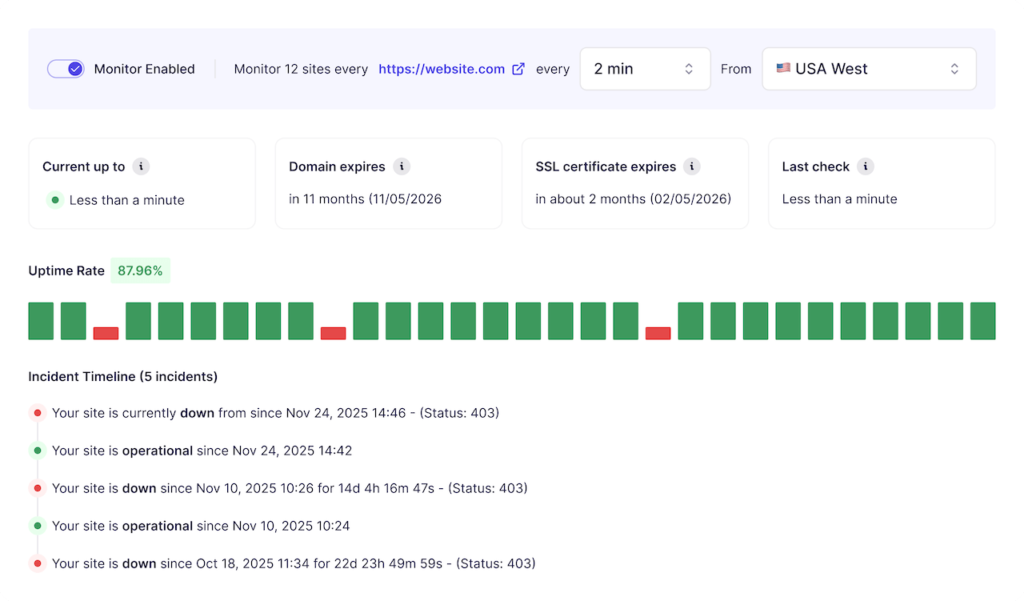
WP Umbrella runs continuous uptime checks from multiple global locations, including Europe, Asia, Australia, and US East and West. Check intervals are configurable from two minutes up to one hour, depending on how time-sensitive each site is. When something goes wrong, alerts go out by email or Slack, and the team can route them to whoever is on call.
Uptime is only part of it. WP Umbrella also tracks response time and Time to First Byte, monitors Google PageSpeed scores so performance degradation is visible before it affects users, surfaces PHP errors at the site level (often the earliest warning of a problem that has not yet caused downtime), and monitors SSL certificate and domain expiry so nothing lapses quietly over a weekend. All of that surfaces in the same dashboard as updates and backups.
Security visibility
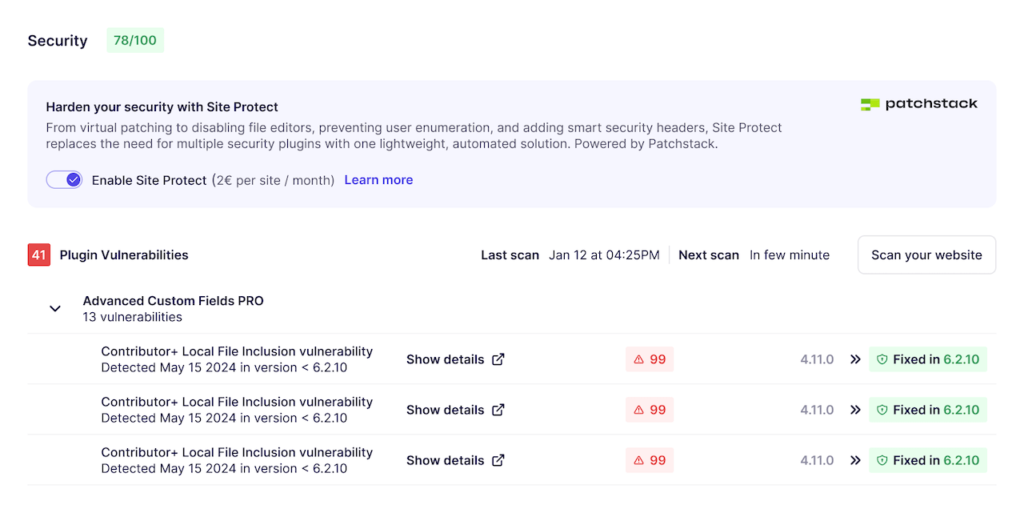
WP Umbrella scans for vulnerabilities continuously (every six hours) using data from Patchstack, which is the same vulnerability database trusted across much of the WordPress ecosystem. Each site gets a dedicated Risks dashboard that lists affected plugins, themes, and core versions, the severity of each issue, and recommended next steps. That turns security from a set of scattered alerts into a reviewable queue inside the same workflow as everything else.
For agencies that want a layer of active protection on top of visibility, we provide a security add-on, powered in collaboration with Patchstack and it applies virtual patches to known vulnerabilities, blocking exploits before the affected plugin has been updated. It also handles a set of hardening rules that would otherwise require separate plugins: disabling user enumeration, restricting XML-RPC access, blocking access to readme.txt and other sensitive files, hiding the WordPress version from HTML output, disabling the theme and file editors, adding security headers, and automatically blocking malicious IPs. All of that runs without the performance overhead of a heavy security plugin, because our add-on is designed to sit quietly in the background rather than run constant scans.
White-label client reporting
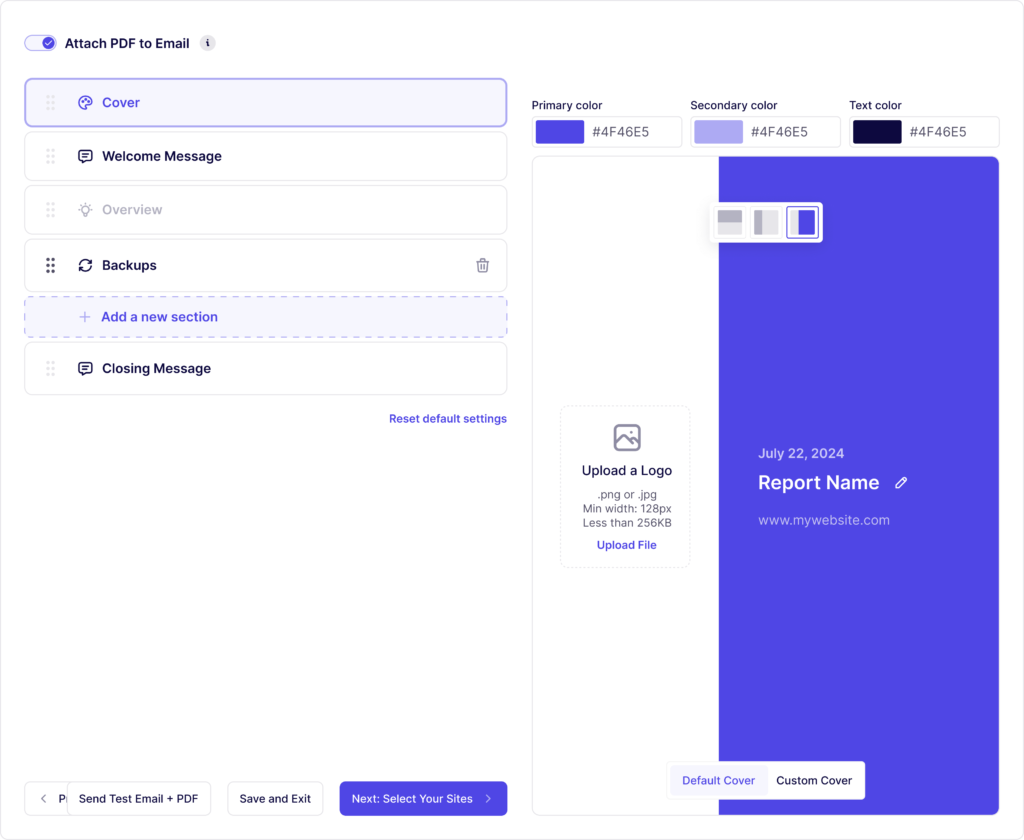
Client reporting is the part of website management that most agencies underestimate until they try to explain a retainer renewal to a client who has no visible record of what has been done for the last twelve months. Maintenance work is mostly invisible to the client by design. The reporting layer is what makes it visible.
WP Umbrella generates white-label reports automatically on whatever schedule the agency chooses: weekly, monthly, or quarterly. Reports include updates applied during the period, uptime statistics, security scan results, backup confirmations, and any custom work the agency wants to log. They can also pull in Google Analytics data for clients who want traffic and performance rolled into the same document.
Also read How Anwert Scaled Maintenance and Strengthened Client Trust with WP Umbrella
Team access, permissions, and audit trails
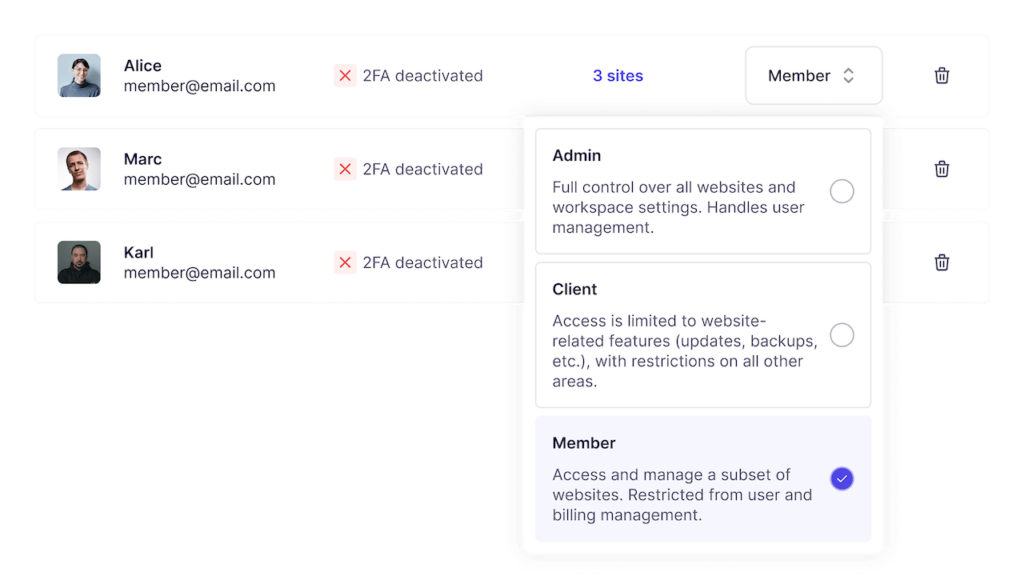
WP Umbrella offers role-based permissions, per-site access control, and a full audit trail of every action taken across the portfolio. Team members log into WP Umbrella with their own accounts and get one-click, secure access to any managed WordPress admin without needing the actual credentials. When a junior team member runs an update, a senior team member rolls back a plugin, or a project manager reviews a backup, every action is logged with who did it and when.
Why WP Umbrella matters for agencies
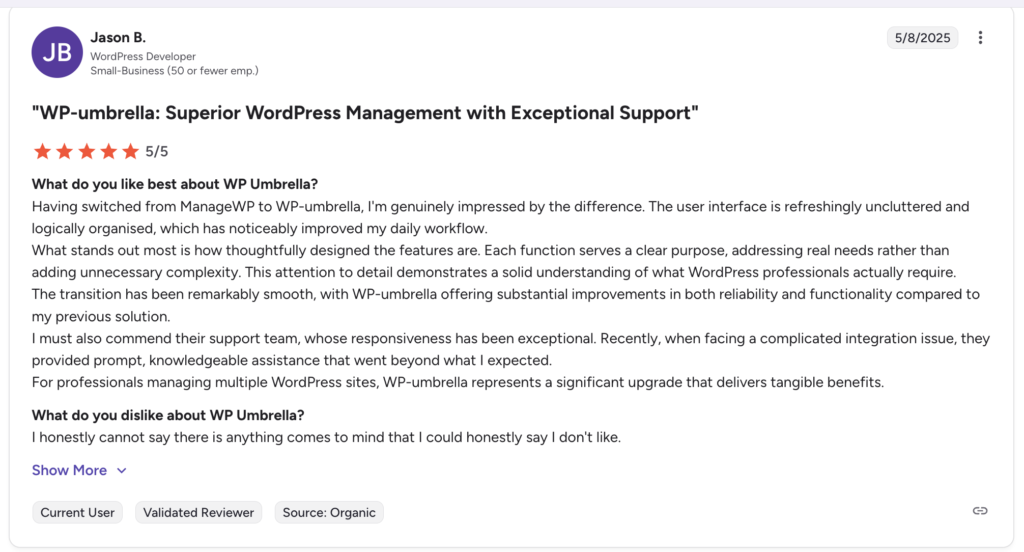
The thing that makes WP Umbrella useful for an agency is that it brings recurring maintenance work into one environment, so the work is easier to run consistently across many sites. For an agency trying to deliver website management services that are both reliable and profitable, operational consistency is harder to engineer than any individual feature.
Agencies that run website management on memory and good intentions are usually the ones where things start slipping after the first six months. Agencies that run it through a system are usually the ones where the work stays consistent over the years.
Read How Rubber Duckers turned website maintenance into a $30K revenue stream with WP Umbrella
How agencies should evaluate website management services
If you are a business owner choosing between agencies or services to manage your website, the questions worth asking are not about the task list. Every credible provider will say they handle updates, backups, monitoring, and security. The differentiators are usually somewhere else:
- How do they communicate when something goes wrong, and how fast?
- What is their restore process if your site goes down, and have they done it recently for someone else?
- What is in scope for support, what is not, and how is that documented?
- What does the monthly report show, and can you read it without needing it explained?
- How many sites does the team manage, and what tooling do they use to keep visibility across them?
A provider that answers those questions clearly is the one delivering the service consistently, regardless of whether they run a one-person freelance practice or a thirty-person agency. A provider who deflects them is often the one whose retainers run on luck.
FAQs about website management services
Website management services usually include plugin, theme, and core updates, automated backups, uptime monitoring, SSL monitoring, security checks, support for minor issues, and regular reporting. Some providers also include performance checks, technical SEO health, and limited content edits.
Website development covers building or redesigning the site, adding features, and handling project-based changes. Website management covers the ongoing maintenance and support work needed to keep the site stable, secure, and performing properly over time.
Agencies often keep website management retainers profitable by centralizing recurring work, defining support scope clearly, automating routine monitoring and reporting, and using a documented process for updates, backups, and incident recovery.
WP Umbrella fits in as the operational layer for agencies managing WordPress sites. It helps centralize updates, backups, monitoring, vulnerability visibility, client reporting, and site access so the maintenance process is easier to run consistently across a portfolio.