
WordPress Maintenance: The Complete Guide for Site Owners, Freelancers, and Agencies
This guide serves three readers. If you own a WordPress site, it shows what maintenance actually involves, what it should cost, and how much you can safely do yourself.


In 2025, the median gap between a WordPress vulnerability going public and attackers exploiting it at scale was five hours, according to Patchstack’s State of WordPress Security 2026 report. Not five weeks. Five hours. Roughly half of the high-impact flaws were hit within a day. That pace redefines the job: WordPress maintenance is no longer a monthly chore but continuous risk management with a scheduled layer on top.
This guide serves three readers. If you own a WordPress site, it shows what maintenance actually involves, what it should cost, and how much you can safely do yourself. If you are about to hire it out, it gives you the market rates and the buying criteria. If you maintain sites for clients, the second half is yours: survey-grade pricing data, the margin math behind profitable care plans, and how to deliver them at scale.
One clarification before the work starts. Looking for the under-construction screen? That’s maintenance mode: a temporary page, not maintenance. This guide covers the real thing.
Every number below links to its source. Where a figure is derived, the arithmetic is shown so you can rerun it with your own inputs.
What Is WordPress Maintenance?
WordPress maintenance is the recurring technical work that keeps a site secure, backed up, fast, and online: applying updates, verifying backups, monitoring for vulnerabilities and downtime, and keeping the database clean. It is not redesigns or new features. It is the operational discipline underneath them.
The discipline exists because of scale. According to W3Techs, WordPress powers 41.5% of all websites, which makes it the single largest attack surface on the web. The platform is also self-managed by design: no vendor updates your plugins, tests your backups, or watches your uptime unless you set that up. Ownership defaults to you.
In practice, the work falls into five task families:
- Updates: WordPress core, plugins, and themes, applied safely and on time.
- Backups: complete off-site copies you have actually test-restored.
- Security monitoring and vulnerability response: knowing within hours when a component you run becomes exploitable, and acting on it.
- Uptime and performance checks: continuous availability monitoring, speed, and Core Web Vitals.
- Database and content hygiene: revisions, spam, broken links, expiring SSL certificates and domains.
Who does the work varies. Owners handle it themselves, freelancers and agencies deliver it to clients as care plans (fixed-scope maintenance subscriptions billed monthly), and platforms automate the repetitive layer. The task list is identical in all three cases; only the operator and the economics change.
Each family fails in its own way: updates break layouts, backups report success while restoring nothing, unpatched vulnerabilities get exploited within hours, downtime surfaces in a client email, and database bloat slows every query. The sections below cover each failure mode, with named incidents and real invoices.
Done well, maintenance is invisible: pages load, forms submit, updates apply without incident. That invisibility is exactly why it gets skipped, and why the next section is all numbers.
Why WordPress Maintenance Matters: The Numbers
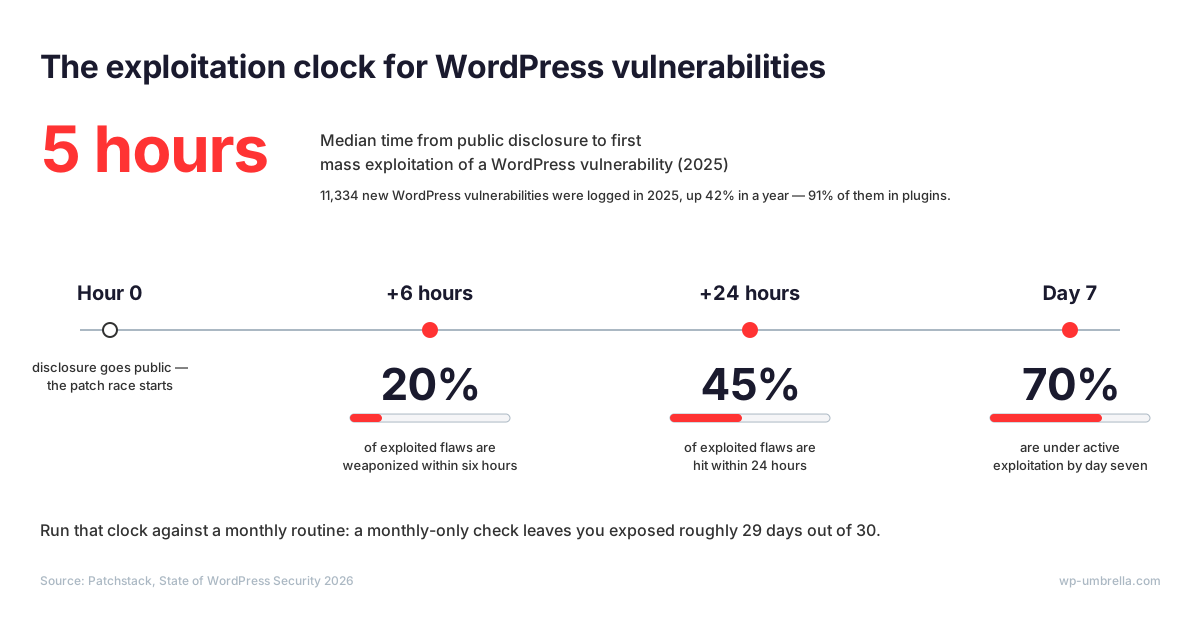
Start with volume. Patchstack’s 2026 annual report logged 11,334 new WordPress vulnerabilities in 2025, up 42% year over year.
91% of those flaws sat in plugins, not WordPress core, and the high-severity share grew fastest of all, up 113% in a year. Your real exposure lives in your plugin list, and it compounds with every install.
Treat the count as a planning input, not a scare line. It tells you the patch stream never pauses, so whatever workflow applies those patches cannot pause either.
Speed is the number that should change your habits. Patchstack’s 2026 data puts the median time from public disclosure to first mass exploitation at five hours, and the distribution is not much kinder than the median: 20% of exploited vulnerabilities are weaponized within six hours.
45% of exploited WordPress vulnerabilities are hit within 24 hours, and by day seven, 70% are under active exploitation. Run that clock against a monthly routine: if you check your sites every 30 days, “monthly maintenance” is mathematically obsolete as a vulnerability response. Monitoring has to be continuous. The monthly slot is for the work that can afford to wait.
Third, the hosting myth. “My host handles security” is the most expensive assumption in WordPress. In Patchstack’s 2026 measurements, hosting-level defenses blocked 26% of vulnerability attacks overall, and just 12% of attacks at the WordPress application layer. The server is defended. The application, where your plugins and users live, is where the rest lands.
But none of that makes managed hosting a bad buy. It makes it a partial one. Hosting covers the server layer; WordPress maintenance covers the application layer the host leaves to you.
Neglect also bills you through downtime. Small-business estimates span $100 to $5,000 per hour, and SMB-focused analyses land in the same wide band. Treat it as a band: your number is what an hour of lost traffic costs your business, specifically. An e-commerce site feels an outage in real time; a lead-generation site feels it next quarter, in the pipeline.
Performance decay is quieter but just as billable. Akamai’s analysis of roughly ten billion retail visits found that a 100-millisecond delay cut mobile conversion rates by 7%, and that 53% of mobile visitors abandon a page that takes longer than three seconds to load.
Keep four numbers from this section; every recommendation in the rest of this guide traces back to one of them:
- Five hours: the median gap from disclosure to mass exploitation
- 91%: the share of flaws that live in plugins
- 12%: the share of WordPress-layer attacks hosting blocks
- Your hourly downtime cost: specific to your business and revenue model
The Core WordPress Maintenance Tasks (and How Often to Do Them)
The short answer: monitoring runs continuously, updates run weekly, database hygiene runs monthly, and restore tests run quarterly. The table below turns the five families into that schedule. Note the structural change from the traditional task list: vulnerability monitoring and uptime belong in the continuous row, not the monthly one. That placement is the direct consequence of the five-hour window.
| Cadence | Tasks |
|---|---|
| Continuous (automated) | Uptime monitoring, vulnerability detection, security scanning, PHP error tracking, scheduled backups |
| Weekly | Plugin, theme, and core updates through a safe workflow; backup completion spot-check |
| Monthly | Database cleanup, broken-link check, performance review, stakeholder or client report |
| Quarterly | Full restore test, admin-account audit, SSL and domain expiry review, plugin inventory prune |
Updates: Core, Plugins, and Themes
With 91% of vulnerabilities living in plugins, updates are your primary patch channel. The catch: the highest-risk components are the ones the WordPress update screen handles worst.
Patchstack found premium plugins and themes are three times more likely to be known-exploited than free ones, and counted 33 critical zero-days in a single year. Premium code does not auto-update through wordpress.org.
It also frequently ships bundled inside a theme, so site owners do not know they are running it. Keep an inventory: every paid plugin and theme, its license status, and where its updates come from.
Professionals already sense the risk in blind automation. Melapress’s 2025 WordPress security survey found designers and developers are the least likely groups to enable auto-updates, at 32% and 33%. That is earned distrust, not negligence. The cure is the workflow in the next section.
Backups: The Task Everyone Lists and Nobody Verifies
Every maintenance list includes backups. Almost nobody restore-tests them, which is why “we had backups” and “we recovered” are different sentences. The silent failure modes deserve their own section, below.
Security Monitoring and Vulnerability Response
Monitoring is a separate task from updating for one uncomfortable reason: 46% of vulnerabilities have no patch available at the moment they are disclosed.
When there is nothing to update, the response is mitigation: deactivate the component, apply a virtual patch (a firewall rule that blocks the exploit pattern before it reaches the vulnerable code), and watch for the fixed release. You can only do any of that if you know, within hours, which of your sites runs the affected component. A continuous watch, not a monthly audit, is what buys that knowledge.
Uptime and Performance Checks
Downtime you discover from a client email costs more than the outage: it costs the relationship. Continuous uptime monitoring at short intervals, from multiple regions, turns “the site was down all weekend” into a five-minute incident with a timestamped alert. Multi-region checks matter because “up for you” and “up for your visitors” are different claims, and only one of them pays the bills.
Pair it with Core Web Vitals tracking and SSL and domain expiry alerts. An expired certificate takes a site down as thoroughly as any attacker, and it announces the neglect in the browser bar.
Database and Content Hygiene
This is the slow-rot layer. Post revisions, spam comments, expired transients, and orphaned tables bloat the database and slow every query; broken links leak authority and frustrate visitors in equal measure.
A monthly cleanup keeps queries fast. A quarterly pass over admin accounts and unused plugins shrinks the attack surface: deactivated-but-installed plugins still ship exploitable code, so delete what you do not use.
For the box-by-box version of this schedule, use our WordPress maintenance checklist. This guide gives you the cadences and the reasoning; that page gives you the tick list.
How to Update WordPress Safely: The Professional Workflow
“Just keep everything updated” is advice written by people who have never watched an update take down a checkout page. Updates carry real, structural risk. WordPress.org introduced phased plugin rollouts precisely because a new release can ship a regression to millions of sites at once, and managed hosts sell human-reviewed, visually tested updates as a premium service.
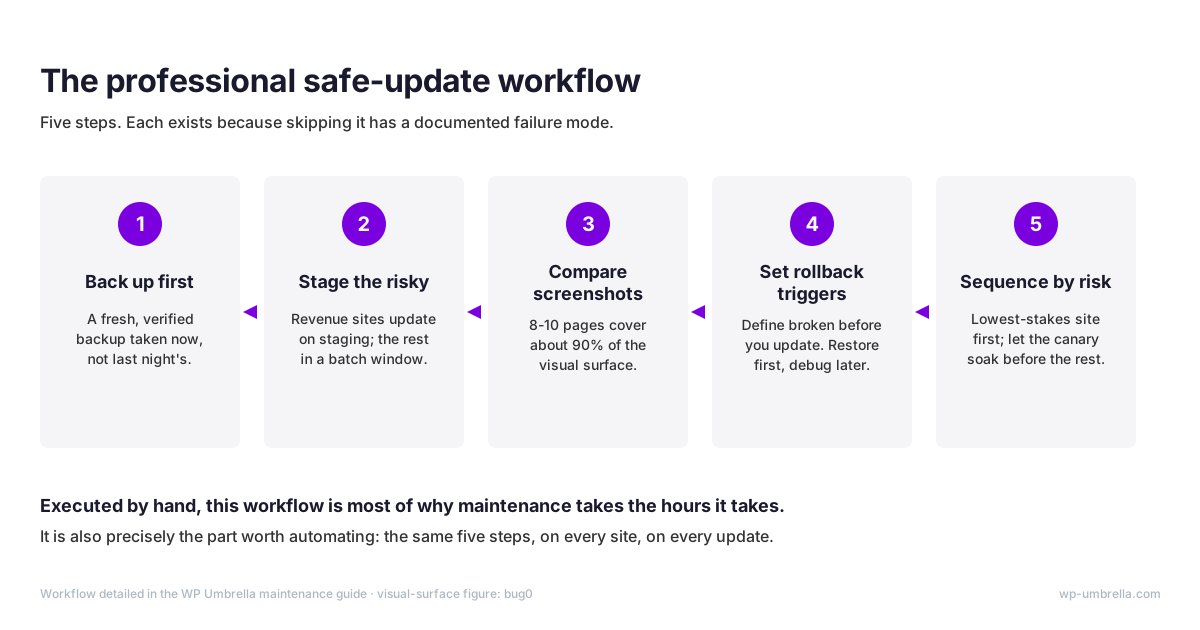
When the platform’s own maintainers and the hosting industry both treat updates as risky operations, believe them. The professional workflow has five steps, and each exists because skipping it has a documented failure mode.
1. Back up before you touch anything. A fresh, verified backup is your rollback point. Not last night’s scheduled backup: one taken now, so a restore returns the exact pre-update state. Confirm it completed and is restorable, not merely scheduled.

If the session starts without one, the session is already broken.
2. Stage the risky, batch the routine. Anything with revenue or complexity (WooCommerce, memberships, custom code) gets updated on a staging copy first. For straightforward brochure sites, a defined batch window with the rollback plan ready is a reasonable trade. Updating a store at 5 p.m. on Friday and logging off is not.
3. Compare screenshots before and after. Visual regression testing sounds enterprise-grade; in practice it means capturing screenshots of key pages before and after an update and diffing them for unintended changes. You do not need every page: one page per template, roughly 8 to 10 scenarios, covers about 90% of a typical site’s visual surface.
Homepage, one post, one product, one category, cart, checkout, contact form. If pixels moved where they should not, you caught it before your client did.
4. Define rollback triggers before you update, not after. Decide in advance what “broken” means: a template renders wrong, checkout errors, forms stop submitting, load time doubles. If a trigger fires, restore first and investigate later. Untriaged debugging on a live site is how a ten-minute update becomes a lost afternoon and an apology email.
5. Sequence the portfolio by risk. Update the lowest-stakes site first and let it soak before the rest follow. Canary ordering means the plugin release that breaks things breaks your test candidate, not the site that pays your invoices. And the work gets a rhythm. Same order, same window, every week so nothing skipped silently.
Two habits multiply the workflow’s value. Read the changelog on major-version jumps, because an x.0 release is a rewrite wearing an update’s clothes. And never let pending updates pile up: the further behind a site falls, the bigger the eventual jump, and the harder the rollback if it goes wrong.
Executed by hand, this workflow is most of why maintenance takes the hours it takes. It is also precisely the part worth automating. Pre-update backups, visual regression comparison, and automatic rollback on failure are the core of WP Umbrella’s safe updates: the same five steps, executed for every site on every update, without the afternoon. The workflow costs minutes per site; skipping it costs the case file that follows.
What Happens When You Skip Maintenance
Skipped maintenance does not fail gradually. It fails all at once, and the record of how is public. Neither incident below required a sophisticated attacker or an unlucky victim. They required only time and an unpatched component.
Two Attacks That Only Hit Unmaintained Sites
December 2014: according to Sucuri’s incident reports, the SoakSoak campaign compromised more than 100,000 WordPress sites, and Google blacklisted over 11,000 domains in a single weekend.
The entry point was a RevSlider vulnerability patched ten months earlier. The cruelest detail: RevSlider shipped bundled inside thousands of commercial themes, so many owners never knew they were running it. That is the premium blind spot from the task list, weaponized.
Blacklisting is its own penalty. Google interrupts every visit with a malware warning, which for a business site is downtime with reputational damage attached.
Balada Injector has been running the same play since 2017, infecting over one million WordPress sites through known plugin and theme vulnerabilities.
Attackers do not exploit bad luck. They exploit missing maintenance: every one of those infections had a patch or a mitigation available first.
Inside a Hacked Site: What Cleanup Actually Finds
Sucuri’s forensic data from the sites it cleaned in 2023: 39.1% were running an outdated CMS at the moment of infection, and 49.2% contained at least one backdoor.
The same report found malicious admin users in 55.2% of infected databases, and SEO spam on 42.2% of compromised sites.
Those last two numbers kill the most common recovery fantasy: “I’ll just restore a backup.” A naive restore brings back your content and the attacker’s admin account together. Backdoors and rogue users survive, and reinfection follows within days. Real cleanup starts with forensics.
The backdoor figure also explains why cleanup pricing has a “deep infection” tier, where quotes reach $1,500 to $3,000+. Finding one backdoor is straightforward; proving there is no second one is the expensive part.
The Full Bill: Cost, Downtime, and the Google Clock
Itemize the incident. Professional malware cleanup typically runs $300 to $800, inside a market range of $100 to $2,500 and up.
Recovery time depends on the backups you verified, or did not: 2 to 4 hours with good backups, one to two days without. Those days are downtime, billed at the hourly band from earlier.
Then Google starts its own clock. After cleanup, you request a review, and Google’s own documentation says malware reviews take “a few days” while spam reviews take “up to several weeks”; phishing, about a day. Your rankings, and the “this site may be hacked” label, wait on Google’s queue, not on your cleanup speed. For that whole window, the site is technically clean but commercially still hacked.
Add it up: cleanup, one to two days of downtime, and weeks of suppressed search visibility. A single incident can invoice like a year of real maintenance, before counting a single lost sale. And none of it includes the soft costs: the client call, the trust repair, the audit of every other site you run.
Vigilance cannot watch a vulnerability feed around the clock. Instrumentation can. WP Umbrella’s continuous vulnerability detection checks every site against a live vulnerability database every six hours, closing the gap between disclosure and your response.
Silent Backup Failure: The Risk Nobody Audits
A site owner on the WordPress.org forums, after what his plugin reported as a successful restore: “UpdraftPlus reported me that the backup has been restored. But I ended up having just emptied directories on the server after restore.” The dashboard said success. The data was gone.
That thread is not an outlier. It is the canonical backup failure: a job that reports green and delivers nothing, discovered at the only moment it matters.
The failure modes are mundane: a PHP memory limit truncates the archive mid-write; a database export stops halfway through a table; nothing verifies file integrity after the copy. The budget-plan flaw is the quietest: the backup lives on the same server it protects, so the failure that creates the need also destroys the remedy. Off-site means a different failure domain, not a different folder.
Verification has to happen at two moments: after the backup runs (checksums, archive size, table counts) and before you rely on it (an actual restore). Most setups do neither. They confirm the job ran, which is not the same claim.
The dividing line is simple. A backup you have restore-tested is an asset. A backup you have not is a hope with a timestamp. Yet Melapress found only 27% of WordPress professionals have a breach-recovery plan, while 64% have experienced at least one breach.
The test is cheap compared to the alternative: restore last week’s backup to a staging URL and click through ten pages. Twenty minutes, once a quarter, per revenue site. And if a provider runs your backups, ask for the date of the last successful test restore; the pause before the answer is the audit.
Hold any backup system to four words: incremental, encrypted, off-site, restore-tested. Incremental means each run captures only what changed since the last one, so backups stay light enough to run daily. That is the standard WP Umbrella’s backups are built to, and the standard you should demand from anything else guarding your data.
What WordPress Maintenance Costs
Most buyers land in the middle of a four-tier market: productized care plans at $50 to $150 per site per month. The prices below are going rates across providers, not one vendor’s list. Which tier a site belongs in tracks its downside, not its size: a five-page site that books $2,000 jobs is a $100-a-month site, whatever its page count.
| Tier | Typical cost | What you get |
|---|---|---|
| DIY | ≈$200/year in plugins + 2–8 hours/month of your time | Full control; coverage depends on your discipline |
| Budget automated services | $30–50/month | Scripted updates and basic monitoring, little human review |
| Productized care plans | $50–150/site/month | The market’s center of gravity: updates, backups, monitoring, reports |
| Premium and developer-led | $240–1,000+/month | Staging, visual regression testing, development hours included |
DIY looks free until you price your hours. Codeable puts routine self-maintenance at 2 to 8 hours per month, plus roughly $200 a year in premium plugin licenses. At even $50 per hour of opportunity cost, that is $100 to $400 a month of labor for one site. The “free” option is only free if your time is. And the arithmetic turns brutal at portfolio size: five DIY sites is a part-time job.
Budget services fill the $30-to-$50 slot with automation and thin margins. That is a fair trade for low-stakes sites, but ask precisely what happens when an update breaks a template: who notices, how fast, and who fixes it. At that price, the honest answer is usually a script, eventually, and you.
The productized cluster at $50 to $150 per site per month is where most agencies and dedicated providers price.
The gap between $40 and $120 a month is usually a human: someone who runs the safe-update workflow, owns the incident, and answers the phone.
At the top, Codeable’s maintenance tiers run $240, $590, and $1,000+ per month, and the $590 tier is the one that adds visual regression testing. Note what the premium tiers actually sell: process. Staging by default, screenshot comparison on every update, a developer on call.
Hourly work runs $50 to $150 for freelancers, $100 to $250 for agencies. For calibration: the average advertised WordPress developer rate is $69 per hour, across 229 published profiles. The premium above that line buys accountability, not effort.
Anchor every tier against the alternative from the last section: one cleanup at $300 to $800 equals several months of a mid-tier care plan, before downtime and the review queue. That is also the honest lens on an “expensive” plan: the question is never the fee, it is the fee relative to the incident it prevents and the hours it returns. Our WordPress maintenance costs deep dive prices that trade tier by tier.
DIY, Hire, or Automate? How to Decide
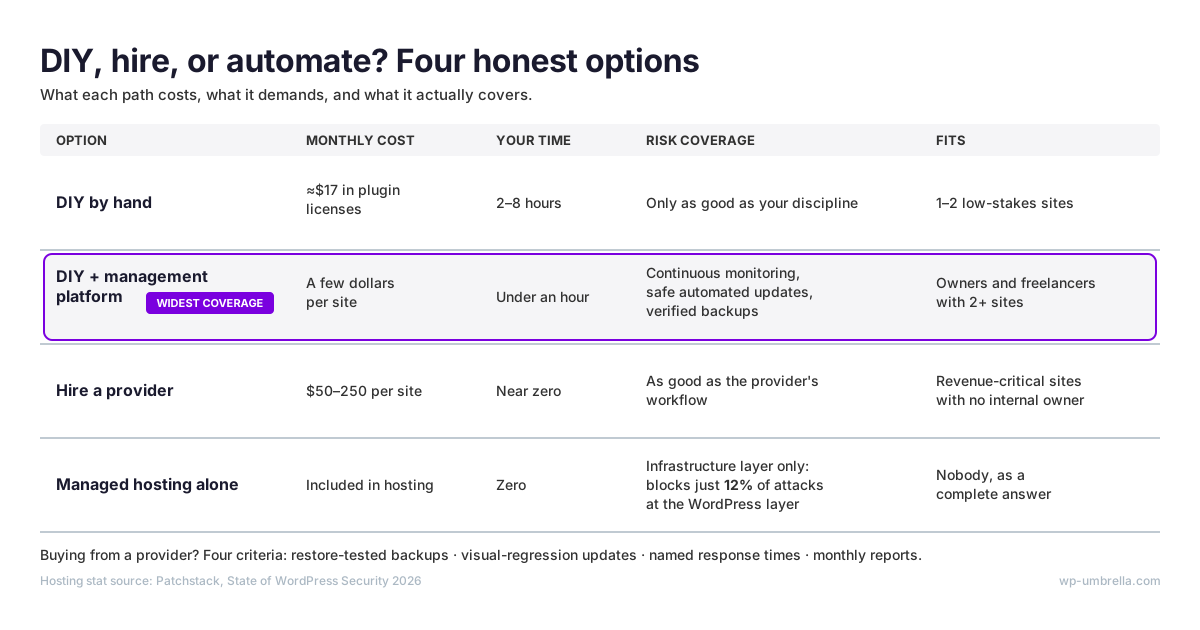
Four honest options, scored on what they cost, what they demand, and what they actually cover:
| Option | Monthly cost | Your time | Risk coverage | Fits |
|---|---|---|---|---|
| DIY by hand | ≈$17 in plugin licenses | 2–8 hours | Only as good as your discipline | 1–2 low-stakes sites |
| DIY + management platform | A few dollars per site | Under an hour | Continuous monitoring, safe automated updates, verified backups | Owners and freelancers with 2+ sites |
| Hire a provider | $50–250 per site | Near zero | As good as the provider’s workflow | Revenue-critical sites with no internal owner |
| Managed hosting alone | Included in hosting | Zero | Infrastructure layer only | Nobody, as a complete answer |
DIY by hand works under two conditions: the sites are genuinely low-stakes, and you will actually spend the hours every month, not just in January. It breaks the moment a site earns revenue or the count passes two, because skipped months are invisible until the incident arrives.
DIY plus a management platform is the professional workflow without the retail price: continuous monitoring, safe bulk updates, and restore-tested backups from one dashboard, with you as the operator. The platform does the watching and the repetitive execution; you keep the judgment calls, like what to update when and what a given site can tolerate.
If you can spare an hour a month, this is the widest coverage per dollar on the table. See how it works.
Hiring a provider is right when the site is revenue-critical and nobody owns it internally. Buy on four criteria, not brochures; each is a standard defined in the sections above:
- Restore-tested backups, with a date for the last successful test restore
- Visual-regression testing on every update
- Named response times
- Monthly reports that show the work
Response time matters more than feature lists. Ask who answers at 9 p.m. on a Saturday — and how you would even learn an incident happened. Read what a real care plan includes before comparing quotes.
Managed hosting alone is the row that catches people. Hosting-level defenses stop just 12% of WordPress-level attacks; hosting is the foundation, not the maintenance. Even hosting companies know it: here is how a hosting provider monetized WordPress maintenance as a care offering on top of its own infrastructure.
There is a fifth row: you maintain sites for clients. Then the question is not whether to do maintenance but how to make it profitable, and the rest of this guide is yours.
Turning Maintenance Into Recurring Revenue
Should your agency offer care plans? The profitability data says yes, unambiguously. You already know the delivery side; what follows is the business case in numbers, so you can price the most predictable revenue line in your business without apology.
The Admin Bar’s 2026 survey of 622 web professionals found that 58.3% of agencies with no recurring revenue are rarely or never profitable. Among agencies where recurring revenue passes a quarter of income, fewer than 10% are unprofitable.
The same dataset shows retainer-based agencies consistently profitable at 51.2%, against 39.8% for hourly billing. Read the findings together and the pattern is blunt: recurring revenue is the strongest profitability signal in the dataset — not agency size, not niche, not headcount. The delivery model drives the margin.
Recurring revenue also changes the shape of the business, not only the total. It smooths the feast-and-famine cycle between projects, funds payroll before the next build closes, and compounds: every site you launch becomes a subscriber, not a goodbye.
The market is mature but mispriced. WP Engine’s data shows 80% of web design professionals already offer maintenance packages, yet 44% feel they undercharge. The opportunity is not inventing the offer. It is pricing and delivering it properly, which is what the next section quantifies.
Productize it while you are at it: a named plan, a fixed scope, a monthly price. Informal “I’ll keep an eye on it” arrangements are how agencies end up doing the work anyway, unpaid, after the first emergency call.
Scope discipline protects the margin. Sell month-to-month, because confidence reads better than lock-in and churn on a good care plan is low anyway. Keep SEO and email marketing out of the plan — they are separate engagements, and the classic scope-creep vectors.
And never sell on fear. Sell uptime, safety, and monthly evidence of work done; a care plan pitched as an extended warranty against disaster attracts clients who churn at the first quiet month.
None of this is theoretical: see how Rubber Duckers built a $30k/year maintenance revenue stream. For the sales motion itself, start with seven techniques for selling WordPress maintenance and the strategic case for care plans in 2026.
The Care Plan Profit Formula: What to Charge and What It Costs to Serve
No ranking page shows this arithmetic, so here it is in three parts: your cost to serve, a worked example, and what the market actually charges.
Your Cost to Serve, Line by Line
Labor is the whole game. A manual update session takes 15 to 30 minutes per site, and a maintained site needs one or two sessions a month. Add backup checks, a monitoring glance, and report assembly, and a realistic manual load is 30 to 60 minutes per site per month.
Price that time at your rate: the $50-to-$150 freelance and $100-to-$250 agency bands from the cost section. If you would never invoice yourself at that rate, the margin you think you have is fictional.
Then add the line most people forget: incidents. A single bad update or restore consumes hours, and at portfolio scale, “rare” events stop being rare. Budget for them explicitly or they will budget themselves.
Last line: tooling. Management platforms range from a couple of euros to over fifty per site per month, depending on vendor and add-ons. WP Umbrella is €1.99 per site per month, flat, with every feature included. The tooling line matters because it is the only cost that does not scale with your hours. We state it once and let the math carry it from here.
A Worked Example: 50 Sites
Assumptions, stated plainly so you can swap in your own numbers:
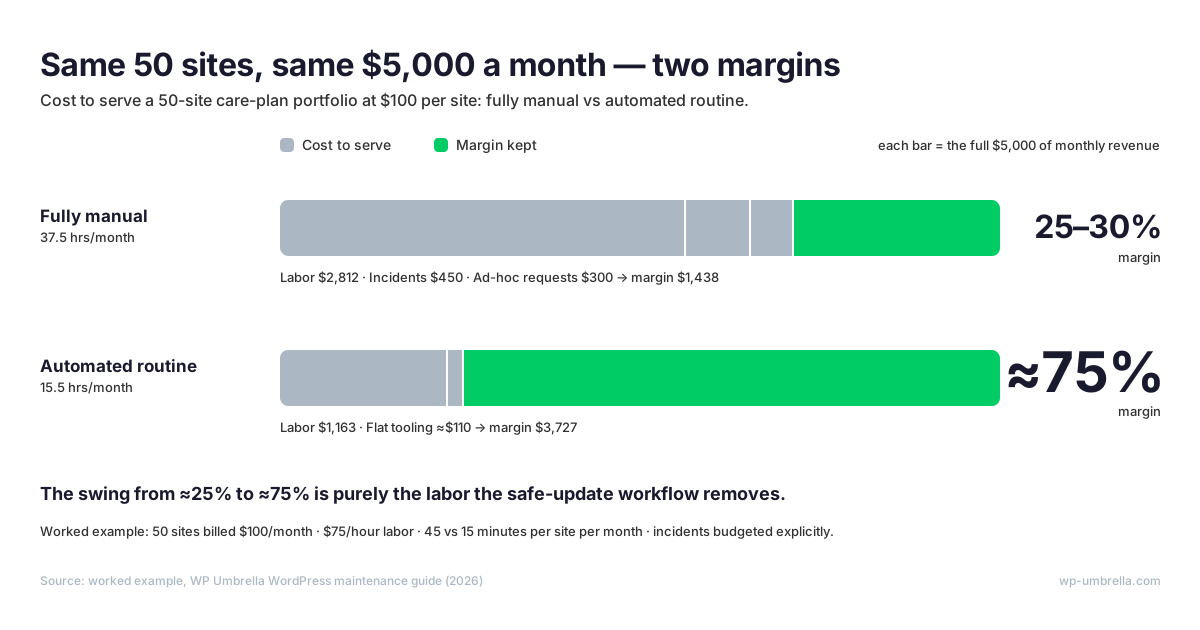
- Portfolio: 50 sites, each billed at $100/month, so $5,000/month of revenue.
- Manual load: 45 minutes per site per month, the midpoint of the session figures above plus backup checks and a monthly report.
- Labor rate: $75/hour, the middle of the freelance band.
Fully manual: 50 sites × 45 minutes = 37.5 hours a month. At $75/hour, that is $2,812 of labor. Margin: ($5,000 – $2,812) ÷ $5,000 = 44% gross, before anything goes wrong.
Things go wrong. Add two update incidents a month at the 2-to-4-hour recovery figure (call it 6 hours, $450) and four hours of ad-hoc client requests ($300), and the effective margin drifts toward 25 to 30%. One genuinely bad month erases it.
Now automate the routine. With bulk updates running the safe workflow, scheduled verified backups, and reports generated automatically, labor collapses to exception handling. Assume a deliberately conservative 15 minutes per site per month of review, plus a 3-hour incident budget: 12.5 + 3 = 15.5 hours, or $1,163 of labor. Tooling: 50 sites × the flat per-site price ≈ $110.
Total cost ≈ $1,273 against the same $5,000: roughly a 75% margin. Same sites, same price point. The swing from ~25% to ~75% is purely the labor the workflow removes. Rerun it with your own inputs; the shape survives.
What the Market Charges
The Admin Bar’s care-plan pricing data, drawn from more than 100 agency sites: independents rarely price below $75 a month, the majority land between $100 and $150, and top plans reach about $250. Treat the $100-to-$150 cluster as a starting point, not a ceiling: the undercharging complaint from the survey above comes from agencies already pricing inside this distribution.
Price on value delivered: uptime, safety, and a monthly report proving both. Your cost to serve sets the floor, never the price. The 44% who feel they undercharge are usually pricing from their costs; the profitable ones price from the client’s downside.
Notice where the curves cross. At the market’s standard $100 rate, the automated workflow’s cost to serve is about $25 per site (the worked example’s $1,273 spread across 50 sites). The market rate already carries the margin; the workflow just stops the labor from eating it.
Run the math on your own portfolio: start your free trial and connect your sites in minutes. No credit card required.
How to Deliver WordPress Maintenance at Scale
First, position. WP Umbrella does not sell maintenance to your clients; agencies do that. We build the infrastructure they run it on. Everything in this section is your workflow, delivered under your brand: your client relationships, your pricing, and your name on the reports stay yours, and the infrastructure stays invisible to everyone but you.
The workflows above hold at five sites. At 30, manual routines crack. Fifty sites on weekly update sessions is 2,600 sessions a year, and at that volume rare failures stop being rare events and become a monthly line item. The failure mode is never one dramatic collapse either; it is drift: updates postponed, reports skipped, one site quietly unmonitored.
Four problems define maintenance at scale: throughput, proof, people, and platform. Each has a workflow answer.
Batching with per-site safety. Scale dies when “bulk” means “blind”. WP Umbrella’s bulk management applies the safe-update workflow to every site in the batch: pre-update backup, visual comparison, automatic rollback, per site, even when two hundred update at once. Schedule the window overnight and review the diffs over coffee: the batch ran, the screenshots are waiting, and the two sites that failed rolled themselves back.
Proving value monthly. Maintenance done well is invisible, and invisible work gets cancelled. Automated white-label reports turn the month’s updates, backups, uptime, and fixes into client-facing evidence, custom work included. A white-label report is a client-facing report issued under your agency’s branding, not the platform’s. Your clients see your name on the work, never ours.
The retention engine of a care plan is the report, not the work; clients renew what they can see. Date-stamp everything: the report doubles as your audit trail when a client asks what they paid for in March.
Team workflows without seat taxes. The worked-example margin should survive hiring. Roles, activity logs, and unlimited team members mean adding an operator adds no license line, every action stays attributable, and one-click admin access removes the password spreadsheet. Attribution matters at scale for the same reason reports do: it turns “someone updated something” into an operations record.
Platform choice as an infrastructure decision. Your care plans will outlive your current host and your current team. Choose tooling that is host-agnostic, so portability stays your leverage; actively developed, so the platform keeps pace with WordPress itself; and priced flat, so plan margins stay predictable as you add sites.
Flat pricing is not about cheapness; a care plan priced on per-site margin cannot absorb a tooling bill that changes shape every quarter.
One more selection signal: several once-dominant platforms have stagnated after acquisitions. Treat vendor momentum as a feature, and check the changelog before you commit your portfolio.
Proof over promises: read how Seahawk cut per-site maintenance time after consolidating its delivery workflow. Their bottleneck was never skill; it was minutes per site, multiplied. The same infrastructure runs 60,000+ sites for 5,000+ agencies.
If you migrate, start where the pain is: move your worst manual afternoon (usually update day) onto the platform first, then let backups and reporting follow.
Start your free trial: 14 days, every feature included, no credit card required. Connect your first sites in minutes and run next month’s maintenance from one place.
WordPress Maintenance FAQ
WordPress maintenance runs on two cadences. Monitoring (uptime, vulnerabilities, backup completion) must be continuous, because Patchstack’s 2026 report puts the median time from disclosure to mass exploitation at five hours. Scheduled work fits a weekly update session, a monthly hygiene pass (database, broken links, report), and a quarterly restore test. A monthly-only routine leaves you exposed roughly 29 days out of 30.
Five task families:
1. Updates: core, plugins, and themes, applied through a safe workflow
2. Backups: off-site, encrypted, restore-tested
3. Security: continuous vulnerability monitoring and response
4. Uptime and performance: availability checks and Core Web Vitals
5. Database and content hygiene: revisions, spam, broken links, SSL and domain expiry
A complete plan covers all five, plus a monthly report showing the work.
The frequency of backups depends on the nature of your website and how often you update its content. However, it’s generally recommended to perform daily backups for most websites. If your site has frequent updates or high traffic, you may want to consider real-time or hourly backups.
Yes, with conditions. Budget 2 to 8 hours per month plus about $200 a year in plugin licenses, and be honest about consistency: a skipped month is silent risk. DIY stops making sense when a site earns revenue, when the count passes two or three, or when your hourly value exceeds what automation or a provider costs.
No. Hosting secures the server, not the application: hosting-level defenses blocked 26% of vulnerability attacks overall and just 12% at the WordPress level. Updates, restore-tested backups, vulnerability response, and reporting remain your job or your provider’s, whatever the hosting plan promises. Treat hosting as the foundation maintenance stands on, never as a substitute for it.
Market data says independents rarely go under $75 a month, most charge $100 to $150, and top plans reach about $250. Price on value (uptime, safety, monthly proof), not on your costs. With an automated workflow, cost to serve drops far enough that the standard market rate carries a 70%+ margin.
Where to start
Site owners: put monitoring and backups on autopilot today, run the safe-update workflow weekly, and keep the monthly hygiene pass. The cadence table above is the whole system; start with the continuous row.
Buyers: hold every quote to the four criteria (restore-tested backups, visual-regression updates, named response times, monthly reports) and the market rates above. Pay for accountability, not for the cheapest line item.
Sellers: price with the profit formula, charge what the market data supports, and put the delivery on infrastructure built for portfolios rather than on heroics.
Whichever reader you are, the deadline is the same: five hours between disclosure and exploitation. The fix is a system, not a scramble.
Get started for free: 14-day free trial, every feature included, no credit card required.